

.png)

It's been a productive quarter at 3Dsellers, with the launch of powerful new AI tools that revolutionize how sellers can create listings and manage their products. With an assortment of new features designed to enhance your AI listing workflow, streamline your platform navigation, and provide you with greater control over every step of listing creation, 3Dsellers is spearheading the way in AI for ecommerce.
Our Q1 update covers how we've completely revamped the Image to Listing experience, introduced a brand-new Spotlight navigation shortcut, and added a Bulk AI Actions menu across both the catalog and listing tool, plus many more functionality improvements and bug fixes we've introduced in April.
There's a lot to cover, so let's dive in and learn more about all the latest features, updates, and bug fixes at 3Dsellers! 👇
1. Redesigned AI Image to Listing Tool
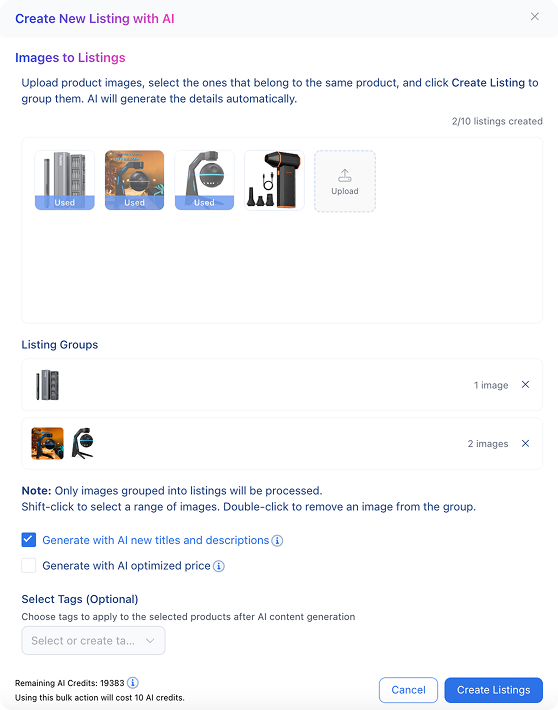
We've completely redesigned the 🔗 AI Image to Listing tool, giving it a brand-new interface and significantly smarter matching logic. You can now upload multiple product images at once and let the new flow handle the rest — our system uses eBay catalog search combined with OpenAI matching to find the closest existing eBay listing for your product and generate a fully populated draft in seconds. The updated matching logic adds an eBay search to the matching process, so instead of generating fields from scratch, the tool finds an existing eBay listing that matches the product as part of its product research. This approach results in significantly more accurate listing titles, item specifics, descriptions, and categorization.
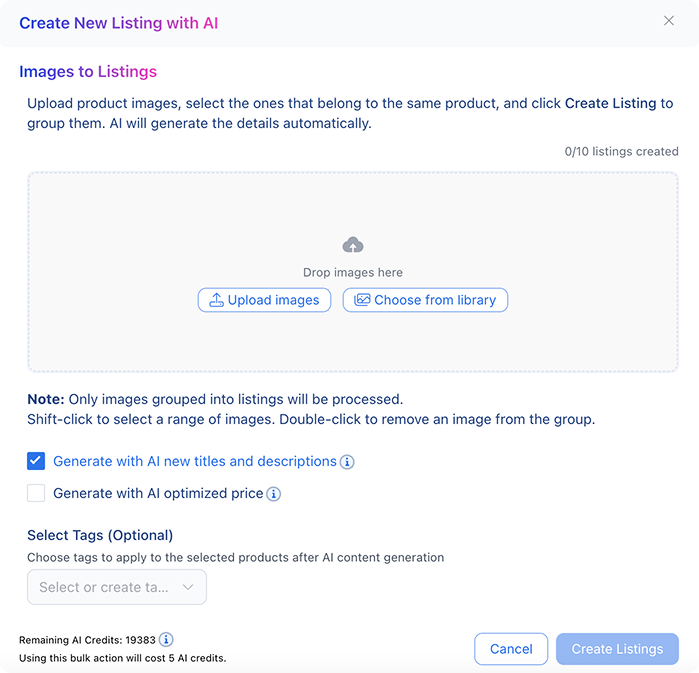
The new multi-image UI supports multiple listing creation in bulk, and makes it easy to work through a batch of new products by uploading in groups. For sellers who source inventory in bulk and need a fast, reliable way to go from product photos to live listings, the bulk AI Image to Listing tool is a gamechanger with immense timesaving potential.
2. Spotlight Navigation for Better Platform Control
You can now jump to any section of the 🔗 3Dsellers app instantly using the new Spotlight navigation shortcut. Simply press ⌘+ k on Mac or Ctrl + k on Windows to open the Spotlight search bar from anywhere in the app and type your query — you can look up anything for features to listings, products, orders, and more, all with a single keystroke.

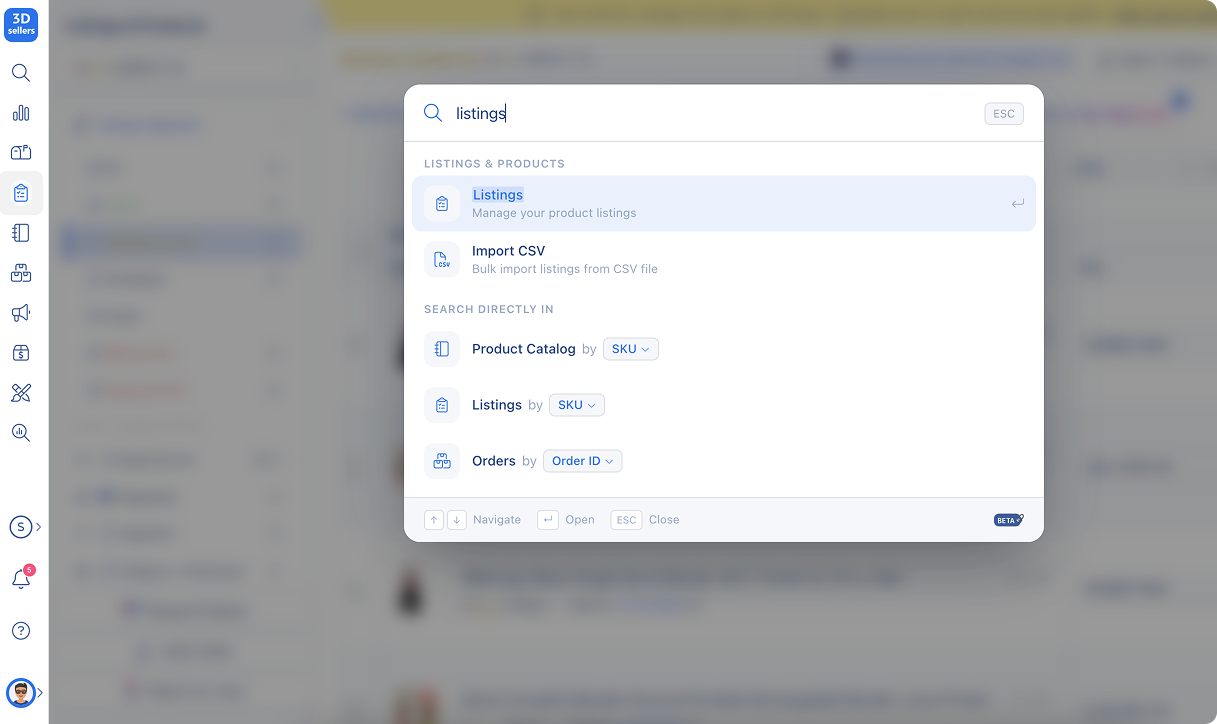
This is useful for sellers who manage large catalogs and switch frequently between the many interfaces and tools offered by 3Dsellers.
3. Bulk AI Actions Menu
A new Bulk AI Actions menu is now available in both the 🔗 Product Catalog and the 🔗 Listing Tool, giving you the ability to utilize AI actions on both products in the catalog and listings. Select any number of listings or catalog products, open the bulk actions menu, and choose from AI actions like title generation, description writing, and item specifics autofill — and apply them across products or listings in one simple bulk action.
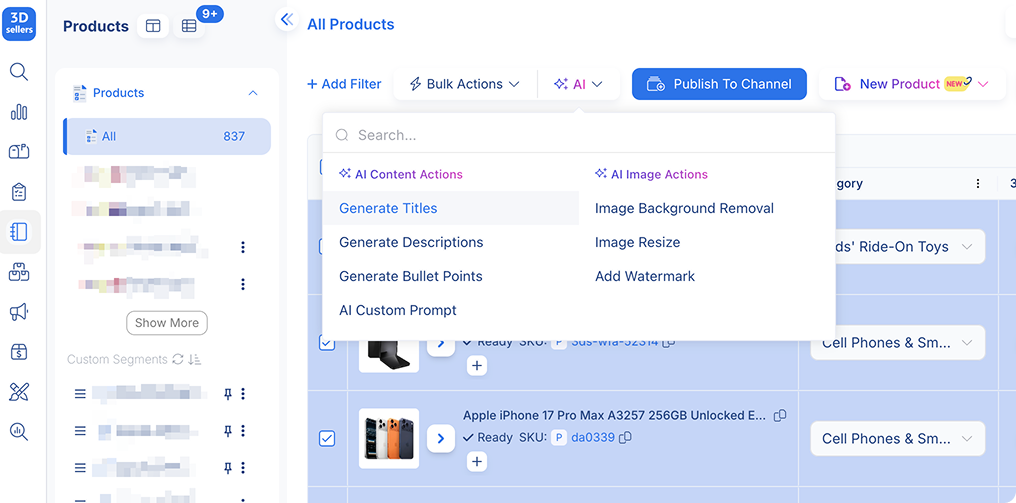
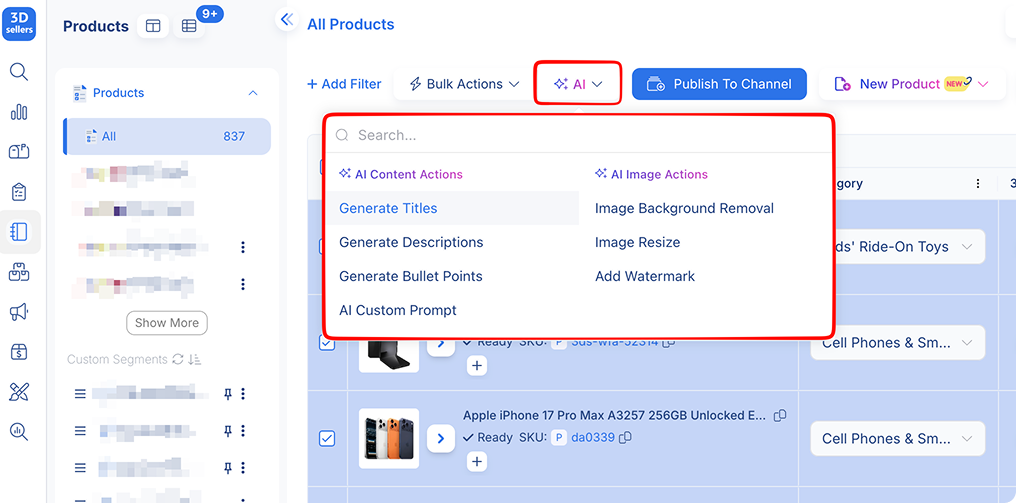
Previously, bulk AI actions were limited to the listing tool, and AI actions had to be applied one product at a time at the catalog level. Now, sellers who regularly import products in bulk can easily optimize their catalog with AI-generated content, saving time and improving accuracy.
4. AI Toggle Controls in Listing Creation
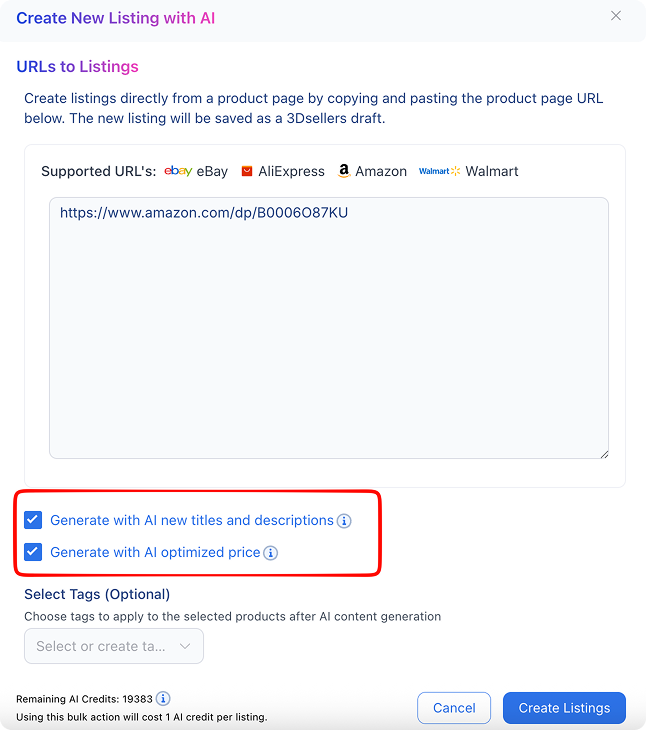
When creating a new listing in the 🔗 Listing Tool using any of the AI-powered listing creation methods — URL to Listing, Image to Listing, or Product Identifier to Listing — you can now decide exactly which fields the AI will generate. Simply check the option next to the AI-generated content you want — titles, descriptions, and prices — and decide in advance what's generated and what you'll fill out yourself.
Previously, AI listing creation would automatically generate SEO-optimized content for all fields by default. While helpful, this behavior sometimes conflicted with sellers' own preferred content.
5. Catalog Editor Quick Actions: End Listing & Inline Inventory Editing
We've added two new quick-action capabilities to the 🔗 Product Catalog and 🔗 Listing Tool that make managing live listings faster and more efficient.
End Listing from the Catalog Editor
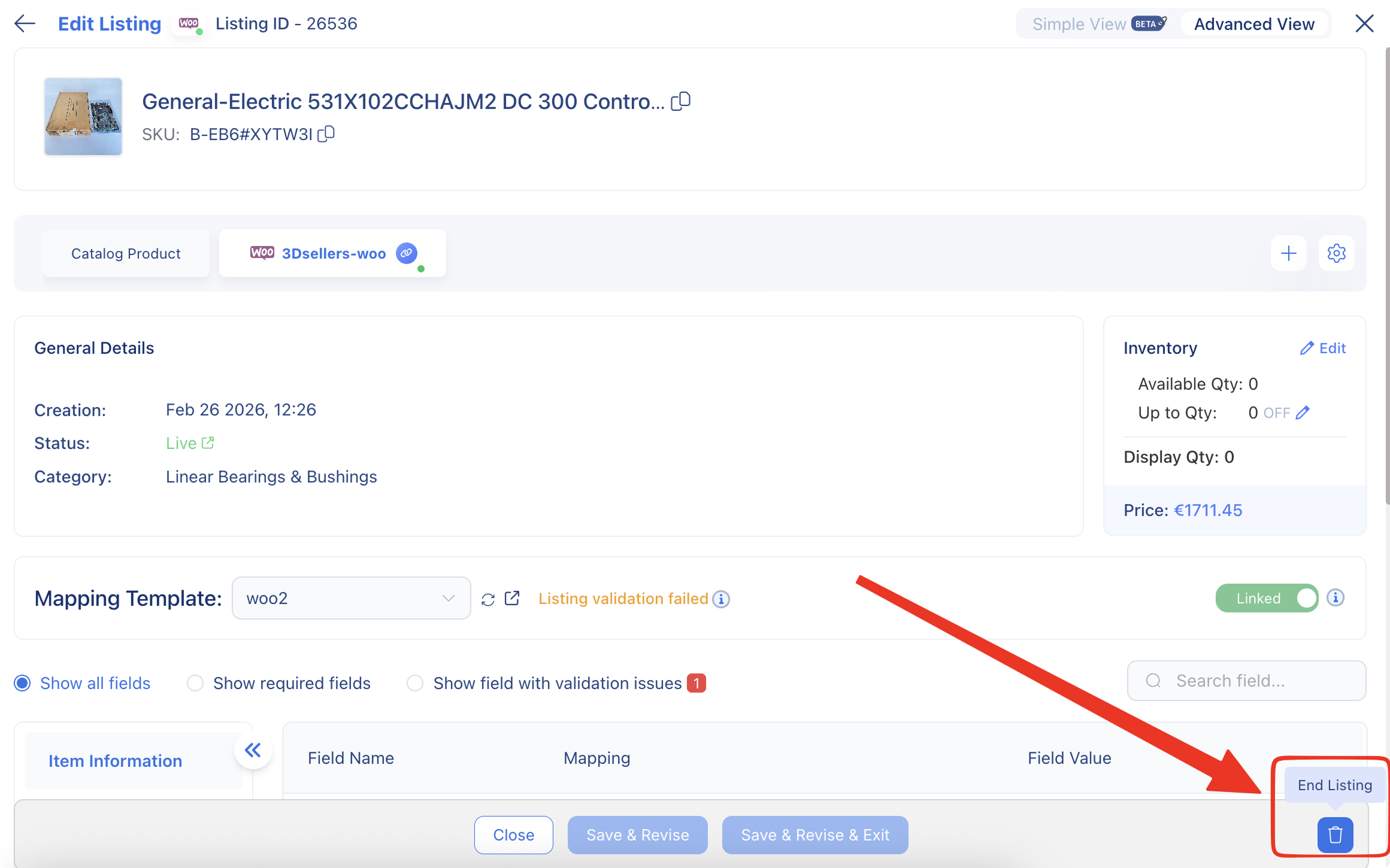
When viewing a live product in the catalog editor, you'll now see an "End Listing" action button in the footer. This button allows you to end a live eBay listing directly from within the product editor, rather than having to navigate to the listing tool.
Edit Inventory from the Listing Table
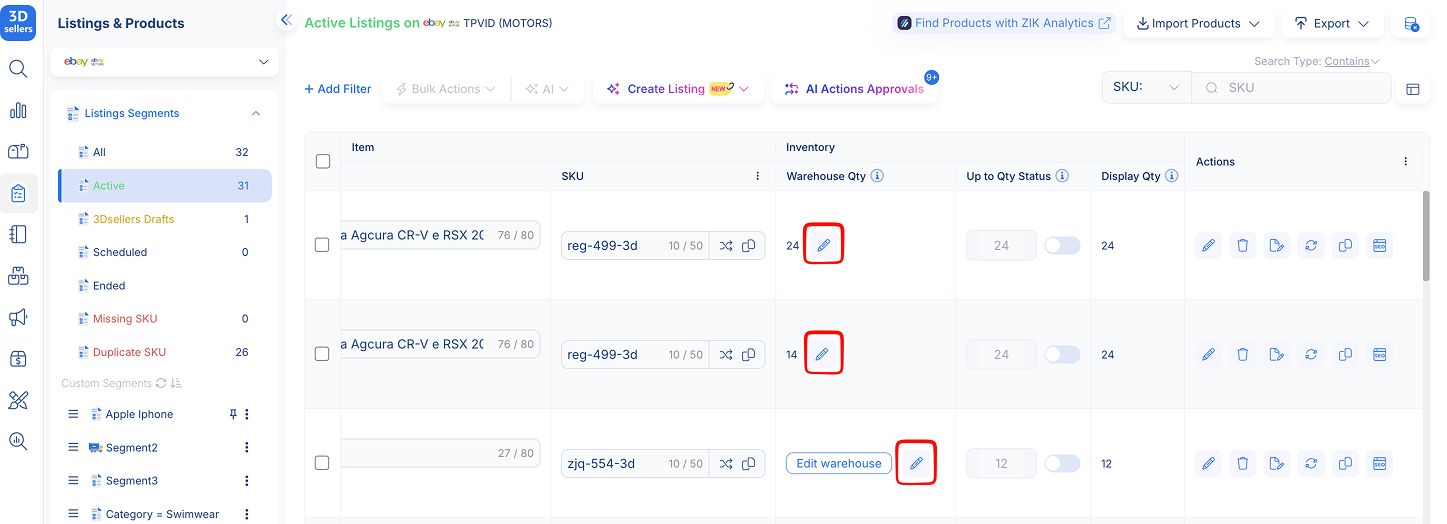
You can now edit inventory quantities directly from the listing table, without having to open the product editor for each item. Simply click the inventory value in the table, update the quantity, and save. This makes inventory adjustments across multiple listings significantly faster when you're already in the listing table view.
6. Edit Listing Before Publish
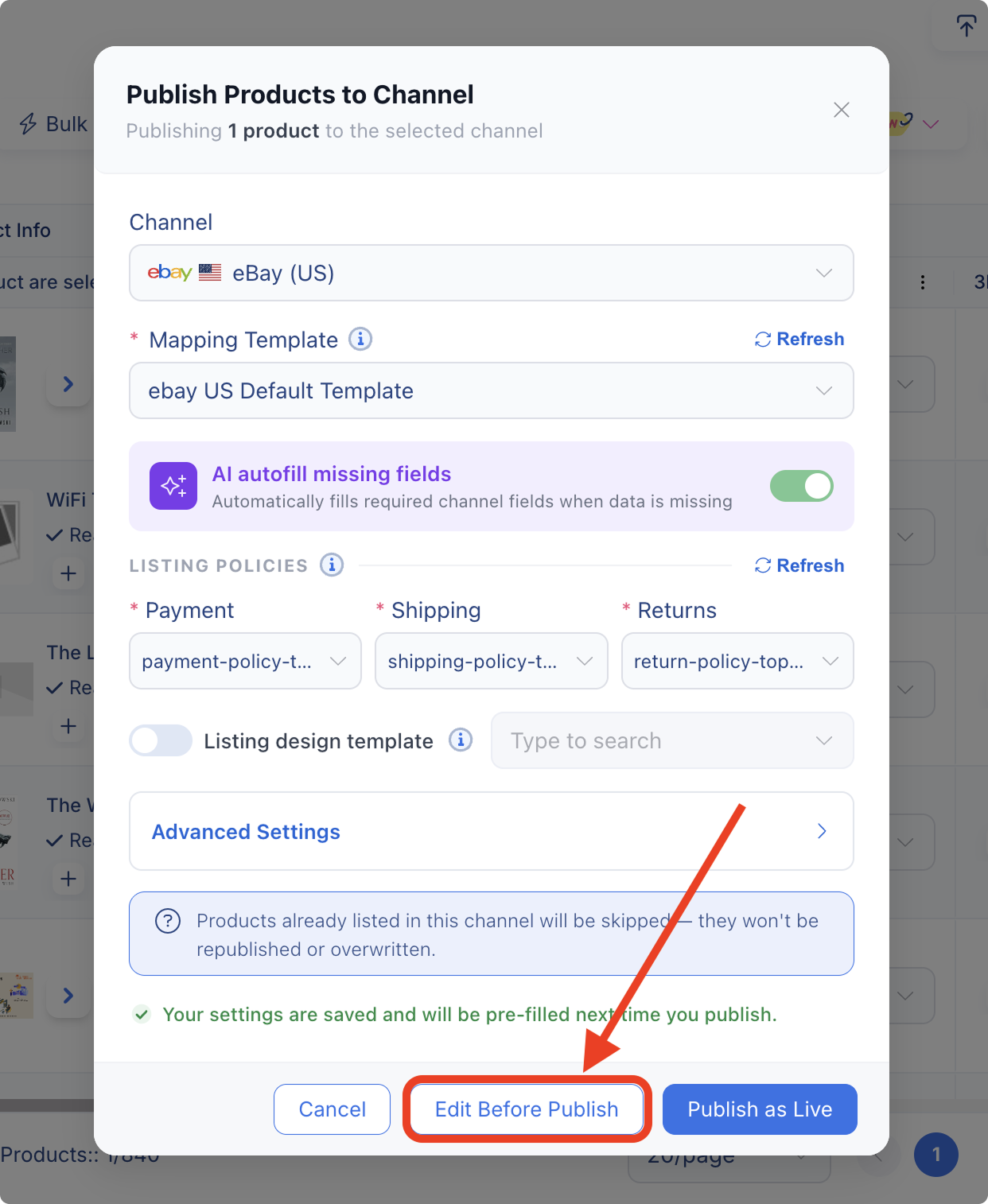
A new "Edit Before Publish" option is now available when publishing listings from the 🔗 Product Catalog. Instead of going straight from draft to live, you now have the option to preview and edit the listing before it's published.
This is a helpful safety net for sellers who use templates, automations, or bulk listing workflows, helping them ensure that listings look exactly as expected before they're published.
Use this feature by clicking on "Edit Before Publish" instead of "Publish as Live" after selecting listing templates and enabling AI autofill if needed. You'll then be able to review and adjust the title, description, price, and item specifics before publishing the product to the channel.
7. Functionality Improvements & Bug Fixes 🐞
We've also addressed several bugs and made improvements across the platform to keep things running smoothly:
🔄 Helpdesk Insights – Missing Records – Resolved an issue where agent-level ticket records were not appearing in the Helpdesk Insights Agents report for recent dates.
🔄 Helpdesk Email Sending – Fixed a bug where outgoing messages were not being sent from custom email addresses in certain account configurations.
🔄 Catalog Last Sold Column – Fixed the "Last Sold" column appearing empty in the catalog table for certain products.
🔄 Catalog Table Auto-Update – Fixed the catalog table not refreshing automatically after a listing is ended from the product editor.
🔄 AI Description Generation – Resolved an issue in the catalog where AI was not generating descriptions when creating listings from product titles.
🔄 GTC Template Assignment – Fixed incorrect assignment of auction listings to GTC listing templates during the listing import process.
🔄 Pricing Automation – Resolved an issue where price reduction automations were not triggering correctly for some items.
🔄 Auto Message Dynamic Fields – Fixed dynamic field placeholders not resolving correctly in automated buyer messages.
🔄 Ticket Status After Reply – Fixed an issue where a helpdesk ticket status remained "resolved" after a new customer message was received.
%20(1).png)

3Dsellers newsletter

.png)
.png)
.png)
