Manage Your eBay Store from Cursor, VS Code or Claude Code
Add the 3Dsellers MCP server to your editor with one config block and your token. The AI in Cursor, VS Code or Claude Code then works with every channel you sell on through 3Dsellers: eBay, Amazon, Walmart, Etsy, Shopify, WooCommerce, BigCommerce, TikTok Shop and more. Ask about listings, orders and inventory, and let it update them through 3Dsellers.

.png)

Manage Your eBay Store from Cursor, VS Code or Claude Code
The 3Dsellers MCP server works with any editor or agent that supports remote MCP servers over HTTP: Cursor, VS Code with GitHub Copilot, Claude Code, Windsurf, Codex CLI and Gemini CLI. Paste one config block with your token, restart the editor, and the AI in your editor gets the same 150+ tools Claude and ChatGPT use: search and update your catalog, publish listings to eBay and other channels, fix item specifics in bulk, run CSV imports and check orders.
Set Up in Three Steps
About five minutes. You need a 3Dsellers account and the editor you already use.
1. Get your token in 3Dsellers
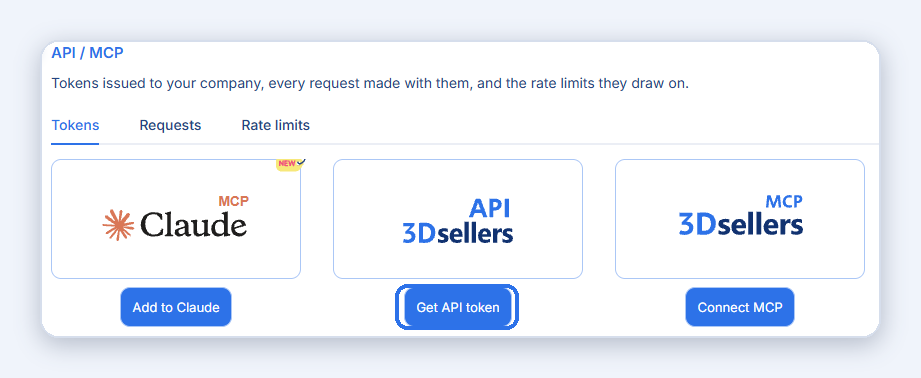
Open Settings > Profile > API / MCP, or go to app.3dsellers.com/api-mcp. Click Connect MCP, then under For developers generate a token and copy it.
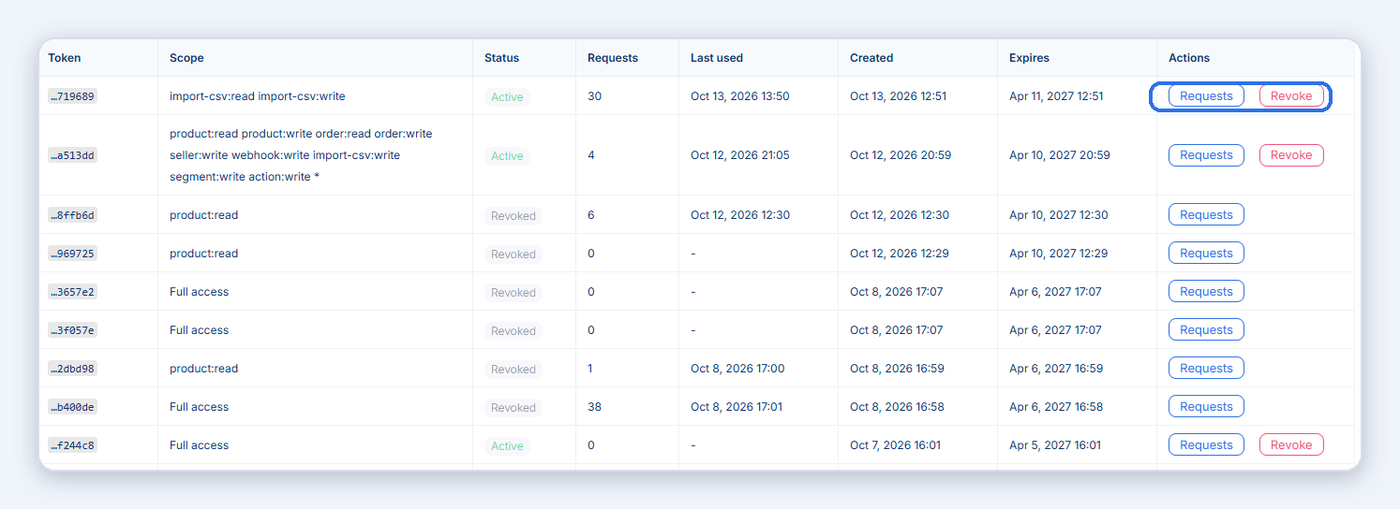
The token is shown once. Anyone with it can read and change your 3Dsellers data. If it leaks, revoke it on the same page and create a new one.
2. Add the server to your editor
Replace YOUR_TOKEN_HERE with the token from step 1. The server URL is the same everywhere; only the file you put it in differs.
{
  "mcpServers": {
    "3dsellers": {
      "type": "http",
      "url": "https://api.3dsellers.com/mcp",
      "headers": {
        "Authorization": "Bearer YOUR_TOKEN_HERE"
      }
    }
  }
}
All projects: ~/.cursor/mcp.json. One project: .cursor/mcp.json in the project root. Or open Cursor Settings > Tools & MCP > Add server.
{
  "servers": {
    "3dsellers": {
      "type": "http",
      "url": "https://api.3dsellers.com/mcp",
      "headers": {
        "Authorization": "Bearer YOUR_TOKEN_HERE"
      }
    }
  }
}
Where: .vscode/mcp.json in your workspace, or the Command Palette: MCP: Add Server. Needs GitHub Copilot with agent mode. Windsurf, Codex CLI and Gemini CLI use the same url and Authorization header in their own config.
claude mcp add --transport http 3dsellers https://api.3dsellers.com/mcp --header "Authorization: Bearer YOUR_TOKEN_HERE"
3. Restart and ask
Restart the editor. 3Dsellers appears in its list of connected tools. Ask: What 3Dsellers tools do you have access to? The AI reads the tool list and explains it.
Tools that change data ask for your approval before they run. Reading your data is free and needs no approval.
Step-by-step guide with screenshots: How to connect AI agents to 3Dsellers using MCP. API reference: api.3dsellers.com/docs.
What You Can Ask from Your Editor
Pick a task to see the conversation. The same tools Claude and ChatGPT use, inside Cursor, VS Code or Claude Code, with your approval before any change. See the full list of 150+ tools.


Cursor
Cursor
Cursor
Cursor
Cursor
5 of them are below 5 units. Want me to tag them "reorder"?
Cursor
.png)
Connect 3Dsellers to Your AI Assistant
One hosted MCP server with 150+ tools. Pick your assistant for the setup steps, examples and answers.

Claude
Official connector in Claude's directory. Sign in, no token.
Connect Claude ->

ChatGPT
Add 3Dsellers as an app with one URL and sign in.
Connect ChatGPT ->

Grok
Add 3Dsellers as a custom connector in Grok and sign in.
Connect Grok ->
Cursor & VS Code
One config block for Cursor, VS Code, Claude Code and other editors.
See the setup ->

Any MCP client
The server URL, the full list of 150+ tools, pricing and FAQ.
See the MCP server ->
3Dsellers Gives You the Tools You Need to Take Your eCommerce Business to the Next Level
The editor connection is built for sellers and developers who already work in Cursor, VS Code or Claude Code and want their store one prompt away. Ask which eBay listings have errors, which products are running low, or which CSV rows failed, and let the AI fix listings, update stock or run imports in 3Dsellers. Every action runs through your own 3Dsellers account with a token you control.
- Add the 3Dsellers MCP server to Cursor, VS Code or Claude Code with one config block and your token.
- Ask the AI in your editor about your eBay, Amazon, Etsy and Shopify products, listings, orders and inventory in plain language.
- Let it update inventory, tag orders, fix listing details, run CSV imports and publish products through 3Dsellers, with your approval before every change.
.webp)
Manage Your Entire Product Catalog from One Place
3Dsellers keeps all your products and listings from every selling channel in one catalog. With the MCP server connected to your editor, you can search and update that catalog by asking. Find products by SKU or title, check where each one is listed, and make changes across channels from a single prompt instead of switching between marketplace dashboards.
%20(1).webp)
Ask the AI in your editor to take products from your eBay store and publish them to Amazon, Etsy, Walmart or Shopify through 3Dsellers. It can review product details, fill in missing fields and send the publish job, so you can grow into new channels without rebuilding every listing by hand.
.webp)
Monitor and Sync Your Inventory in Real Time Across All Channels
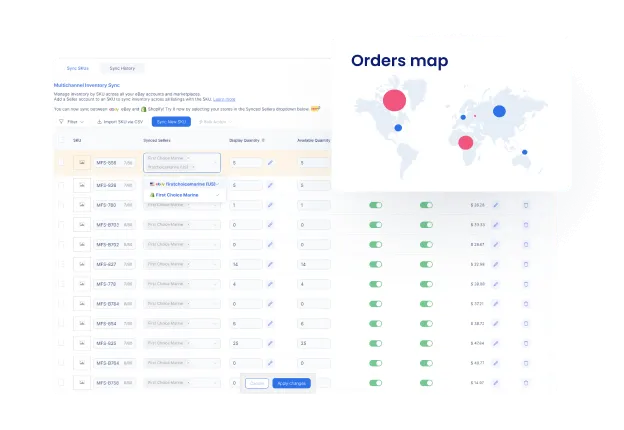
Ask which products are low on stock, update the quantity on a listing or a variation, and let 3Dsellers sync the change to every connected channel. Daily inventory checks become a quick prompt, and overselling on eBay or Amazon becomes much less likely.
Synchronize Pricing Across All Your Selling Channels
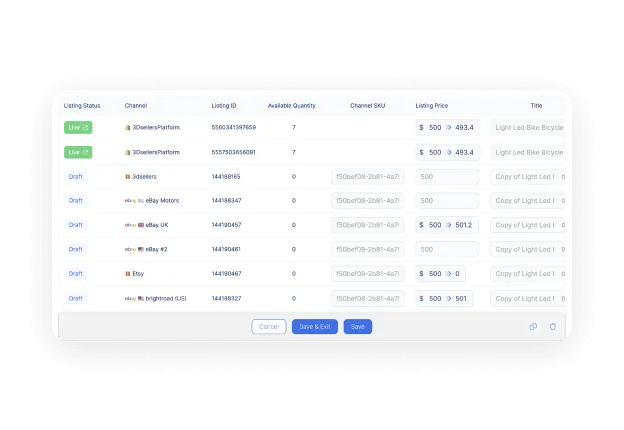
Ask the AI to compare prices across your listings, find products priced differently on different channels, and prepare price updates in 3Dsellers. You approve the changes, and 3Dsellers pushes them to every marketplace.
.webp)
Enhance your Product Data with Custom Product Attributes
Ask which products are low on stock, update the quantity on a listing or a variation, and let 3Dsellers sync the change to every connected channel. Daily inventory checks become a quick prompt, and overselling on eBay or Amazon becomes much less likely.
Ask the AI to review your listing titles, descriptions and item specifics, point out what is missing, and fill in product attributes in 3Dsellers in bulk. Complete product data helps your listings rank better on eBay and Amazon search and gives buyers the details they need.
.webp)
Tailor Products to Each Selling Channel with Custom Channel Mapping
Each marketplace expects product data in its own format. The MCP server exposes the channel-specific fields, so the AI in your editor can suggest how your product attributes should map to each channel and prepare the data before you publish, so your eBay, Amazon and Etsy listings all come out right.
Quickly Assign Products to Categories on Each Channel with the Smart Category Mapper
Ask the AI to find products with unmapped categories, suggest the right eBay or Amazon category for each one, and set the category mapping in 3Dsellers. Correct categories make your products easier for buyers to find on every channel.
.webp)
.png)
.webp)
.png)
.webp)
.png)
.png)
.png)
.webp)
Connect Seamlessly with 3DsellersAcross Multiple Sales Channels
3Dsellers connects your eBay, Amazon, Etsy, Walmart, Shopify and WooCommerce stores in one place. With the MCP server in your editor, all of that is one prompt away: check orders, sync inventory, fix listings and publish products from Cursor, VS Code or Claude Code, while 3Dsellers does the work on each marketplace.

Authentication
Securely connect your account and access the 3Dsellers API with ease. The Authentication API ensures that only authorized requests are processed, providing a safe and reliable way to integrate your systems. Use it to generate access tokens, verify token status, and maintain uninterrupted access for seamless API integration.
Products
Manage your product catalog efficiently and sync products across all sales channels. The Products API allows you to retrieve, add, update, and remove products, ensuring your inventory is always up to date. Automate product updates, streamline catalog management, and reduce manual work while keeping product data accurate and consistent.
Inventory
Keep your stock levels accurate and in sync across platforms. The Inventory API enables real-time updates, checks on current stock, and automatic synchronization of inventory quantities. This helps prevent overselling, ensures accurate product availability, and optimizes inventory management for better operational efficiency.
Orders
Simplify order management and track every transaction effortlessly. The Orders API allows you to fetch order lists, create new orders, and update order statuses. Streamline the order process, reduce manual work, and ensure that your order information is always current across all channels.
Webhooks
Receive instant notifications for key events on the platform. The Webhooks API allows you to set up automated alerts for product updates, inventory changes, and order events. React in real-time, automate workflows, and ensure your system stays updated with minimal effort.
Health
Monitor system health and ensure smooth operations. The Health API provides real-time information about service availability, integration status, and system performance. Stay informed about technical issues, maintain stable integrations, and deliver reliable service to your customers.
Reach More Buyers by Listing on Multiple Selling Channels
3Dsellers connects your eBay, Amazon, Etsy, Walmart, Shopify and WooCommerce stores in one place. With the MCP server in your editor, all of that is one prompt away: check orders, sync inventory, fix listings and publish products from Cursor, VS Code or Claude Code, while 3Dsellers does the work on each marketplace.
Create Category
Creates a new product category in 3Dsellers Catalog.
Create Product
Creates a new product in 3Dsellers Catalog.
Find Products
Find all products, optionally matching the specified SKU.
Find Orders (beta)
Find all Orders, optionally matching the specified buyer.

Step 1: Generate your secure MCP URL
Get your unique, dynamic MCP server URL instantly. This endpoint securely connects your AI assistant to Zapier's vast integration network.
Step 2: Choose your Zapier Actions
Customize the specific actions your AI assistant can perform within 3Dsellers. Select and scope actions to align with your 3Dsellers workflows.
Step 3: Connect with your tool of choice
Integrate your AI Assistant seamlessly using your generated MCP endpoint, enabling your AI Assistant to execute real-world tasks securely and reliably.
Trusted by 5,000+ eCommerce Sellers
.webp)
.webp)
.webp)
.png)
Get unlimited access to 3Dsellers free of charge for 7 days!


Enjoy Better, More Streamlined Multichannel Commerce with 3Dsellers' Integrations
3Dsellers integrates with a wide selection of popular ecommerce platforms and channels, allowing you to easily sync product and order data, automate processes, and streamline operations across multiple channels. With 3Dsellers' powerful integrations, you'll enjoy improved efficiency and fewer errors, allowing you more time to focus on growing your business. Maximize your sales and effortlessly scale your business with 3Dsellers' multichannel integrations.


FAQ
Short answers to the questions developers ask before they add 3Dsellers to their editor.

Yes. VS Code connects through GitHub Copilot's MCP support. Add the server block to .vscode/mcp.json with your token, or use the command MCP: Add Server, then open Copilot in agent mode.
Yes. Add the server block to ~/.cursor/mcp.json for all projects or .cursor/mcp.json for one project, or add it from Cursor Settings > Tools & MCP. Restart Cursor and 3Dsellers appears in the connected tools.
Yes. Run one command in the terminal: claude mcp add --transport http 3dsellers https://api.3dsellers.com/mcp --header "Authorization: Bearer YOUR_TOKEN_HERE". The tools are available in the next session.
In 3Dsellers, open Settings > Profile > API / MCP, click Connect MCP and generate a token under For developers. The token is shown once; copy it right away. You can see, review and revoke every token on the same page.
No. 3Dsellers is already connected to your eBay account, so the AI works through 3Dsellers. There is nothing to apply for.
It never sees your eBay password. It connects to 3Dsellers with a token or a sign-in, can only use the tools listed on the 3Dsellers MCP page, and asks for your approval before it runs a tool that changes data. You can revoke the token from Settings > API / MCP at any time.
No. The connection is included in every 3Dsellers plan, including the free trial. Actions the AI runs use AI actions that you buy in advance in the AI Lite, AI Pro or AI Elite package. Reading your data is free.
Get unlimited access to 3Dsellers free of charge for 7 days!
No credit card required, cancel any time.
