3Dsellers REST API: Products, Listings and Orders on Every Channel
A REST API over your whole 3Dsellers account: 132 endpoints for products, listings, orders, Helpdesk, CSV imports, exports, automations and bulk actions, on every channel you sell on: eBay, Amazon, Walmart, Etsy, Shopify, WooCommerce, BigCommerce, TikTok Shop and more. One bearer token from Settings, JSON over HTTPS, webhooks for new orders, and an interactive OpenAPI reference.


A REST API for Your Whole 3Dsellers Account
The 3Dsellers API is a REST API at https://api.3dsellers.com with 132 endpoints. It covers what you see in the app: products and catalog, listings and publishing, orders and tracking, Helpdesk tickets, CSV imports, exports, automations, offer rules, auto messages, Listing Designer templates, category and field mapping, bulk actions and webhooks. One token works for every channel connected to your 3Dsellers account: eBay, Amazon, Walmart, Etsy, Shopify, WooCommerce, BigCommerce, TikTok Shop and more, with no eBay or Amazon developer account of your own. The same platform runs the 3Dsellers MCP server, so an endpoint and its MCP tool share one token, one rate limit and one request log.
Get Started in Three Steps
About five minutes. You need a 3Dsellers account with admin rights and any HTTP client.
1. Get your token in 3Dsellers
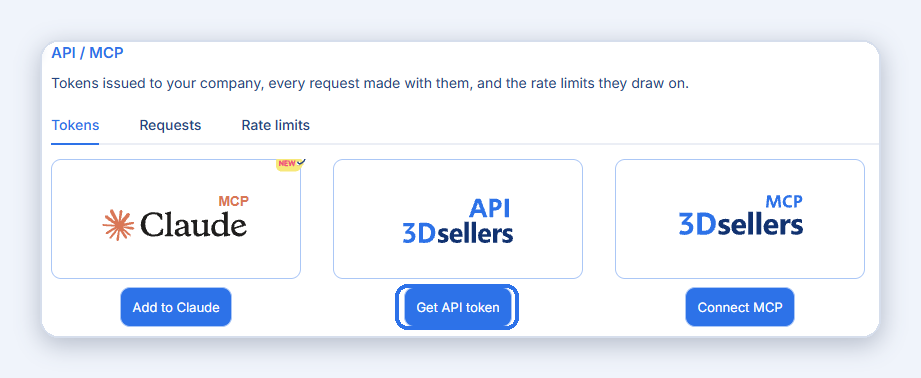
Open Settings > Profile > API / MCP, or go to app.3dsellers.com/api-mcp. Click Get API token. The token is a bearer token tied to your company, and it is shown once, so copy it right away.
No OAuth is needed for your own scripts and integrations. Anyone with the token can read and change your 3Dsellers data, so keep it private and revoke it on the same page if it leaks.
2. Make your first call
Every request goes to https://api.3dsellers.com as JSON over HTTPS, with the header Authorization: Bearer YOUR_TOKEN. Resource endpoints are versioned under /v1/. Check the token first, then list your connected selling accounts: most per-account calls take a sellerId from that list.
curl https://api.3dsellers.com/auth/me \
  -H "Authorization: Bearer YOUR_TOKEN"
curl https://api.3dsellers.com/v1/sellers \
  -H "Authorization: Bearer YOUR_TOKEN"
3. Read, then write
Search products by SKU, patch the fields you want to change, or push tracking back to the marketplace. Reads return at once. Long jobs such as publishing, bulk edits and CSV imports are queued as bulk actions: the call returns an ID and you poll it until it finishes.
curl "https://api.3dsellers.com/v1/products?sku=MY-SKU-123" \
  -H "Authorization: Bearer YOUR_TOKEN"
curl -X PATCH https://api.3dsellers.com/v1/products/12345 \
  -H "Authorization: Bearer YOUR_TOKEN" \
  -H "Content-Type: application/json" \
  -d '{ "price": 24.99, "quantity": 40 }'
curl -X POST https://api.3dsellers.com/v1/orders/tracking \
  -H "Authorization: Bearer YOUR_TOKEN" \
  -H "Content-Type: application/json" \
  -d '{ "items": [{ "orderId": 987654, "carrier": "USPS", "trackingNumber": "9400111899560000000000" }] }'
Every call shows up in the request log
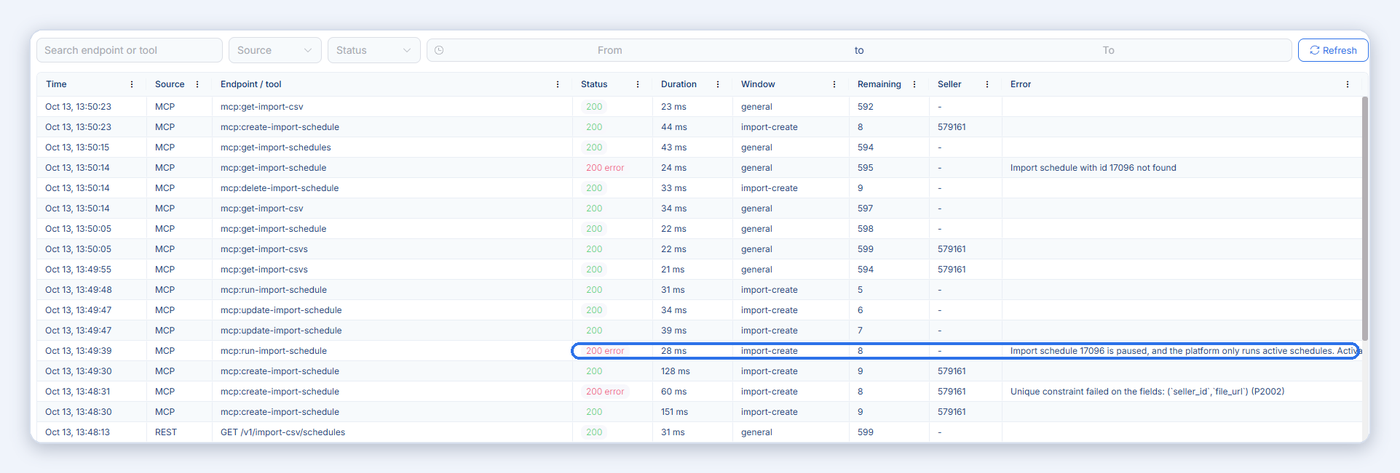
The Requests tab in Settings > API / MCP logs each call with time, endpoint, status, duration and the error message when it failed. Use it to debug an integration without contacting support. See Manage tokens, permissions and requests below.
Building an app other sellers will authorize?
Use the OAuth 2.0 authorization code flow: send the seller to GET /auth/authorize, exchange the code at POST /auth/token, send the access token as a bearer, and renew it with grant_type refresh_token. GET /auth/me confirms a token is still valid. Details are in the API reference.
Guides: Getting started with the 3Dsellers API, Working with the developer API and What can you do with the 3Dsellers API?
Every Endpoint: 132 Endpoints in 16 Groups
This list is generated from the live OpenAPI spec. GET endpoints read your data. POST, PATCH, PUT and DELETE create or change it. Open any group in the interactive API reference to see parameters and responses and try every call with your own token.
Authentication
Products & Catalog
Listings
Categories & Field Mapping
Selling Accounts & Policies
Orders
Bulk Actions, Webhooks, Rate Limits and Scopes
The four things to know before you build on the API.
Bulk actions
Publishing, catalog and listing edits, image work and other long jobs run as bulk actions. POST /v1/actions queues one by its action pattern, GET /v1/actions/{id} tracks it to completion. An action can target records by a filter instead of IDs, and saved segments (GET /v1/segments) store the same filter shape, so a filter a seller already built can be reused. Up to 5 actions run at the same time per company.
Bulk Actions developer guide and the machine-readable pattern catalog with every action and its config schema.
Webhooks
Subscribe your URL with POST /webhooks/subscribe instead of polling. Events: order.created, import-csv.status-updated and helpdesk.message-created. GET /webhooks lists your subscriptions with their delivery health, and POST /webhooks/unsubscribe removes one. Webhooks are a REST feature and are not available through the MCP server.
Rate limits
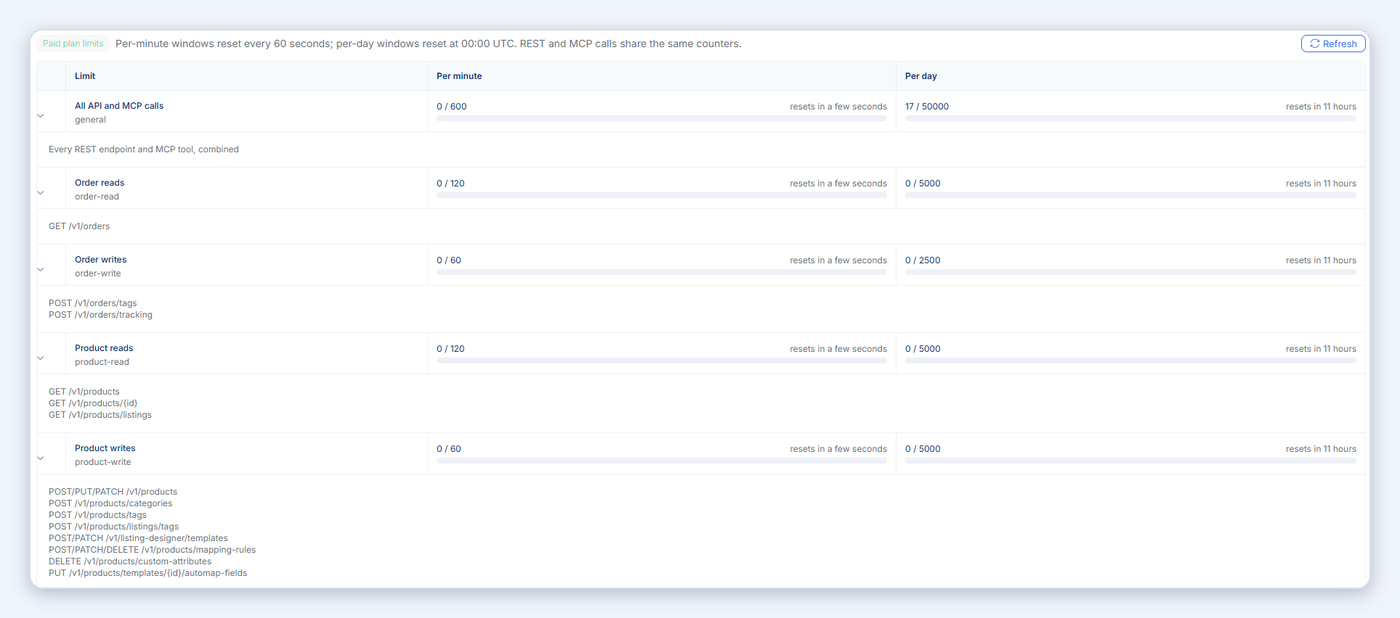
Calls are counted per company across the REST API and the MCP server together: 600 per minute and 50,000 per day on a paid plan, 300 per minute and 20,000 per day in trial. Some operations have their own narrower windows on top, for example 120 order reads a minute and 20 queued bulk actions a minute. Over a limit you get 429 with a Retry-After header, and every response carries X-RateLimit-Limit, X-RateLimit-Remaining and X-RateLimit-Reset. Daily counters reset at 00:00 UTC. The full table is at the top of the API reference.
Access and scopes
The API is included in every 3Dsellers plan, including the free trial. The company behind the token needs an active subscription or trial, otherwise every endpoint returns 403 subscription_required. A token carries scopes such as product:read, product:write or Full access. An "insufficient scope" error means the token is valid but not allowed for that area: create a new token that covers it. Only account admins can create tokens.
Manage Tokens, Permissions and Requests
Every AI assistant and integration connects to 3Dsellers with a token. The API / MCP page in Settings shows every token, what it is allowed to do, every call it made, and how much of your rate limit is left.
Connect and create tokens
Open Settings > Profile > API / MCP, or go to app.3dsellers.com/api-mcp. Add to Claude connects Claude with a sign-in and no token to copy. Get API token creates a bearer token for your own script or integration. Connect MCP shows the server URL and a token for developer tools such as Cursor, VS Code and Claude Code.
A token is shown only once, when it is created. Copy it right away and keep it private.
See what each token is allowed to do
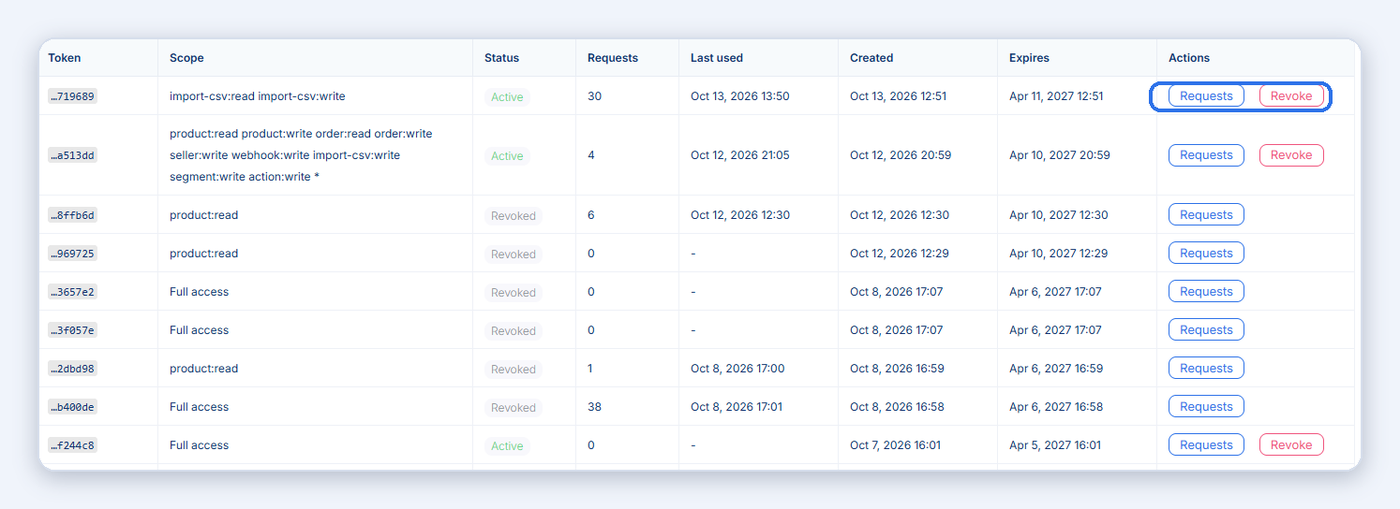
The Issued tokens list shows every token with its app, scope, status, request count, last use and expiry. The scope is the permission: product:read can only read products, product:write can change them, and Full access means every tool.
Revoke stops one token on its next request. Revoke all cuts off every app and AI agent at once; use it if a token leaked.
Review every call the AI made
The Requests tab logs every REST API call and every MCP tool call: time, source, tool name, status, duration and the error message when a call failed. Filter by token, source, status or date, and click a row for the full details.
Values that look like secrets are shown as [redacted], and only people in your 3Dsellers company can see the log.
Watch your rate limits
The Rate limits tab shows each limit, how much of it you used this minute and today, and when it resets. REST and MCP calls share the same counters: on a paid plan, 600 calls a minute and 50,000 a day for all tools combined, with separate limits for order and product reads and writes.
Per-minute counters reset every 60 seconds, per-day counters at 00:00 UTC.
Full guide: API / MCP page: tokens, request log and rate limits.
REST API or MCP Server?
Same platform, same token, same limits. Pick by who is doing the work.
Use the REST API when you write the code
Your own scripts, an ERP or warehouse system, a custom dashboard, or an app other sellers authorize through OAuth. You control every request, you get webhooks, and you can try each endpoint in the interactive reference.
Use the MCP server when an AI assistant does the work
Claude, ChatGPT, Grok, Cursor, VS Code or Claude Code call the same operations as tools, in plain language, and ask for your approval before they change anything. No code, and for Claude no token either: sign in and go.
Documentation and Guides
Everything is public. No sign-up is needed to read the reference.
Reference
Interactive API reference (Swagger UI): every endpoint, parameter and response shape, generated from the live API, with a Try it out button.
OpenAPI 3 spec (JSON): import it into Postman, Insomnia, an SDK generator or an AI coding tool.
Bulk Actions developer guide and action pattern catalog: how queued actions and the filter tree work.
Help Center
3Dsellers Public API & MCP collection: all API and MCP articles in one place.
Getting started, What can you do with the API (with curl examples) and the API / MCP page: tokens, request log and rate limits.
Need an endpoint that does not exist yet? Use the Need more MCP tools? button on the API / MCP page in Settings, or write to support.

Connect 3Dsellers to Your AI Assistant
One hosted MCP server with 120+ tools. Pick your assistant for the setup steps, examples and answers.

Claude
Official connector in Claude's directory. Sign in, no token.
Connect Claude ->

ChatGPT
Add 3Dsellers as an app with one URL and sign in.
Connect ChatGPT ->

Grok
Add 3Dsellers as a custom connector in Grok and sign in.
Connect Grok ->

Cursor & VS Code
One config block for Cursor, VS Code, Claude Code and other editors.
See the setup ->

Any MCP client
The server URL, the full list of 120+ tools, pricing and FAQ.
See the MCP server ->
3Dsellers Gives You the Tools You Need to Take Your eCommerce Business to the Next Level
The 3Dsellers API is designed for ecommerce businesses looking to enhance their operational efficiency. Whether you want to automate order processing, manage inventory updates, or sync customer data, this API provides a flexible solution to improve your productivity. With comprehensive documentation and easy setup, you can focus on what matters most—growing your business.
Managing Your Listings and Products from Your Own Code has Never Been Easier!
- Effortlessly connect your online stores with the 3Dsellers API to manage your products and orders.
- Automate notifications to your team or customers with ease using API triggers.
- Sync product updates across platforms to ensure consistency in your listings.

Manage Your Entire Product Catalog from One Place
The 3Dsellers API simplifies the management of your ecommerce operations from one central location. By automating tasks such as inventory updates and order processing, you can reduce the risk of errors and save valuable time. The intuitive API allows you to set up workflows without any coding knowledge, making it accessible for everyone.

Easily Cross-List Your Products to Multiple Selling Channels with the 3Dsellers API
With the 3Dsellers API, you can publish your products to multiple channels automatically. This means that any changes made in your online stores can be reflected across all your connected platforms, ensuring that your listings are always up-to-date and accurate. This API simplifies your multichannel strategy and helps you reach more customers.

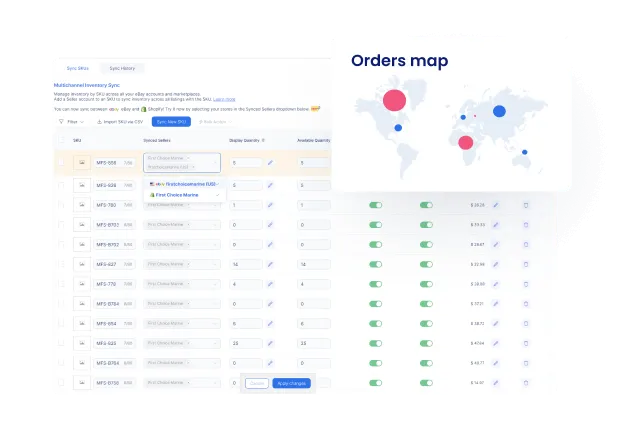
Monitor and Sync Your Inventory in Real Time Across All Channels
Stay on top of your inventory with automated tracking through the API. The integration allows you to set triggers that update your inventory levels in real-time, preventing overselling and ensuring customer satisfaction. With the 3Dsellers API, you can manage your stock levels efficiently across all sales channels.
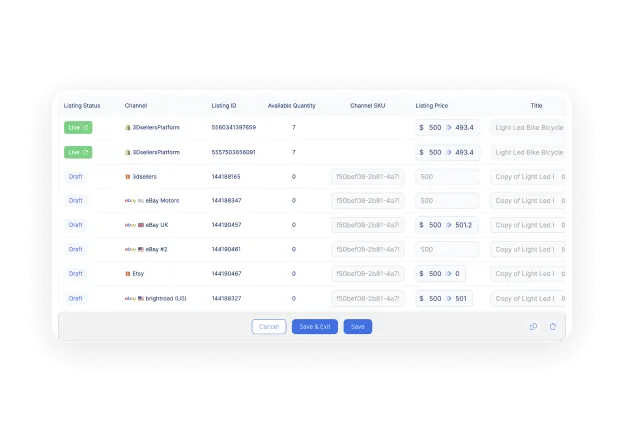
Synchronize Pricing Across All Your Selling Channels
Optimize your pricing strategy with automated price adjustments based on market trends. The API allows you to set rules that automatically update your prices in 3Dsellers based on data from other applications, helping you stay competitive and maximize your profits.

Enhance your Product Data with Custom Product Attributes
Enhance your product listings with custom attributes that can be automatically populated through the API. This feature allows you to provide potential buyers with detailed information, improving their shopping experience and increasing the likelihood of sales.

Tailor Products to Each Selling Channel with Custom Channel Mapping
The 3Dsellers API enables you to tailor your product data for each selling channel. By mapping your product attributes and defining custom rules, you can ensure that your listings are optimized for visibility and compliance across all platforms.
Quickly Assign Products to Categories on Each Channel with the Smart Category Mapper
Proper categorization of your products is crucial for visibility. With the 3Dsellers API, you can automate the categorization process, ensuring that your products are correctly mapped to their respective categories across all channels, making it easier for buyers to find what they are looking for.


Connect Seamlessly with 3Dsellers Across Multiple Sales Channels
The 3Dsellers API offers a robust solution for ecommerce businesses aiming to streamline operations and boost efficiency. By leveraging the API, you can automate product management, inventory updates, and order processing, reducing manual work and ensuring accurate data across all your sales channels. Focus on growing your business while the API handles the repetitive tasks.

Authentication
Securely connect your account and access the 3Dsellers API with ease. The Authentication API ensures that only authorized requests are processed, providing a safe and reliable way to integrate your systems. Use it to generate access tokens, verify token status, and maintain uninterrupted access for seamless API integration.
Products
Manage your product catalog efficiently and sync products across all sales channels. The Products API allows you to retrieve, add, update, and remove products, ensuring your inventory is always up to date. Automate product updates, streamline catalog management, and reduce manual work while keeping product data accurate and consistent.
Inventory
Set the stock that 3Dsellers pushes to every channel. PATCH /v1/products/listings/inventory and /variations set one listing's or one variation's warehouse quantity, and POST /v1/products/inventory-sync links products to Inventory Sync by SKU.
Orders
Simplify order management and track every transaction effortlessly. The Orders API allows you to fetch order lists, create new orders, and update order statuses. Streamline the order process, reduce manual work, and ensure that your order information is always current across all channels.
Webhooks
Subscribe your URL once with POST /webhooks/subscribe and 3Dsellers calls it for three events: order.created, import-csv.status-updated and helpdesk.message-created. GET /webhooks lists your subscriptions with their delivery health.
Health
GET /health/live and GET /health/ready answer without a token and tell you whether the API is up and ready to serve requests. Point your own uptime monitor at them.
Reach More Buyers by Listing on Multiple Selling Channels
The 3Dsellers API offers a robust solution for ecommerce businesses aiming to streamline operations and boost efficiency. By leveraging the API, you can automate product management, inventory updates, and order processing, reducing manual work and ensuring accurate data across all your sales channels. Focus on growing your business while the API handles the repetitive tasks.
Trusted by 5,000+ eCommerce Sellers


Get unlimited access to 3Dsellers free of charge for 7 days!


Enjoy Better, More Streamlined Multichannel Commerce with 3Dsellers' Integrations
3Dsellers integrates with a wide selection of popular ecommerce platforms and channels, allowing you to easily sync product and order data, automate processes, and streamline operations across multiple channels. With 3Dsellers' powerful integrations, you'll enjoy improved efficiency and fewer errors, allowing you more time to focus on growing your business. Maximize your sales and effortlessly scale your business with 3Dsellers' multichannel integrations.



FAQ
Short answers to the questions developers ask before they build on the 3Dsellers API.

The API is included in every 3Dsellers plan, including the 7-day free trial, with no separate API fee. The company behind the token needs an active subscription or trial. Rate limits depend on the plan: 600 calls a minute and 50,000 a day on a paid plan, half of that in trial.
No. 3Dsellers already holds the connection to each marketplace account you added in the app. One 3Dsellers token lets your code read and change products, listings and orders on eBay, Amazon, Walmart, Etsy, Shopify, WooCommerce, BigCommerce, TikTok Shop and every other connected channel, without marketplace API keys of your own.
Log in to 3Dsellers, open Settings > Profile > API / MCP (app.3dsellers.com/api-mcp) and click Get API token. You need admin rights in the account. The token is shown once; copy it and send it as Authorization: Bearer YOUR_TOKEN on every request. Revoke it from the same page if it leaks.
The interactive reference at api.3dsellers.com/docs is generated from the live API and is always current. The OpenAPI JSON is at api.3dsellers.com/docs-json. The list on this page is built from the same spec.
Yes. POST /webhooks/subscribe registers your URL for order.created, import-csv.status-updated and helpdesk.message-created. GET /webhooks shows your subscriptions and their delivery health. Webhooks work with the REST API only, not through the MCP server.
Publishing, bulk edits, image work, exports and CSV imports are asynchronous. The call queues a bulk action or job and returns its ID. Poll GET /v1/actions/{id} (or the matching import or export endpoint) until the status says it finished. A 200 response is not the same as a finished job.
Yes. Products support variations, and inventory can be read and written per listing, per variation and per warehouse: PATCH /v1/products/listings/inventory and /variations set quantities, and PUT /v1/sellers/integrations/inventory-sync turns catalog inventory sync on or off.
Yes, with OAuth 2.0 authorization code flow: send the seller to GET /auth/authorize, exchange the returned code at POST /auth/token, use the access token as a bearer and renew it with grant_type refresh_token. GET /auth/me confirms a token is valid.
They run on the same platform with the same token and the same rate limits. Use the REST API when you write your own code or need webhooks. Use the MCP server when an AI assistant such as Claude, ChatGPT, Grok or Cursor should do the work in plain language, with your approval before changes. See the 3Dsellers MCP page for the tool list.
Get unlimited access to 3Dsellers free of charge for 7 days!
No credit card required, cancel any time.
