Free eBay Listing Template Design Editor
3Dsellers' free eBay listing template designer helps you create scroll-stopping, mobile-responsive eBay listings in minutes with a simple and intuitive drag-and-drop editor, no coding skills required! Stand out from millions of sellers and skyrocket your sales – all 100% free!



How to Create Your Own Free eBay Listing Template Design
Designing your very own professional eBay listings is now easier and faster than ever. No learning curve and no headaches, just results.
Our free WYSIWYG listing designer puts a selection of powerful design tools at your fingertips, allowing you to create your own custom designs with zero coding skills.

Choose Your Starting Point
Pick a column layout or choose from 3 pre-made templates below. Or start with a blank canvas and unleash your creativity. Every option is mobile-responsive and conversion-optimized.
Customize Everything
Drag, drop, and style your listing template your way. Insert images, adjust colors, add compelling copy, and make it uniquely yours in minutes.
Preview on Various Devices
See exactly how your listing looks and performs on desktop, tablet, and mobile displays. What you see is exactly what your buyers get every time.
Copy & Launch on eBay
Generate your HTML code with one click, paste it into eBay's listing editor, and instantly transform any listing into a professionally designed, sale-driving powerhouse!
Select Your Template and Start Designing
Why start from scratch when you can get a head start? Choose one of our 3 free, professionally designed templates below and customize it to match your brand. Want even more options? 3Dsellers members get access to a selection of specialized premium templates right inside the app!
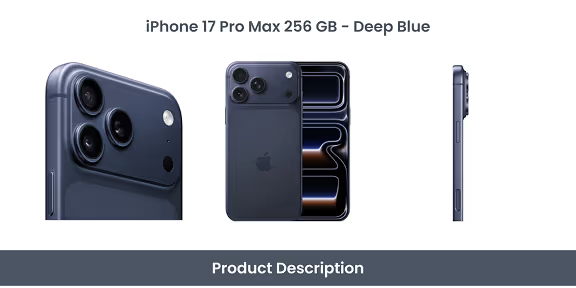
Electronics Pro
Perfect for tech products, gadgets, and electronics with detailed specifications.
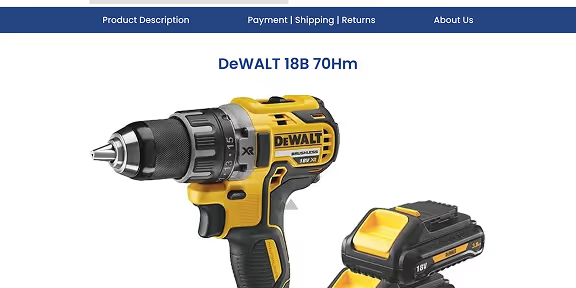
Tools & Equipment
Designed for power tools, construction materials, and DIY project supplies.

Auto Parts & Accessories
Ideal for listing auto parts, vehicles, and accessories on eBay Motors.
eBay Listing Design Editor (WYSIWYG HTML)
Managing hundreds of listings? 3Dsellers members have access to 40+ premium design templates that can be customized and applied in bulk to live eBay listings with one click.

1. Edit and Customize Your Template

Select a template from the options above or start with a blank canvas
Use the editor to add your brand logo and images
Customize colors, fonts, and layout to match your brand
Add the product description and details
Add "About Us" and "Policies" sections (highly recommended!)
Preview on desktop, tablet, and mobile
2. Copy Your HTML Code
Click the "Copy HTML Code" button
Code is now saved to your clipboard
3. Go to eBay
Log into your eBay Seller account
Click "Create Listing" or edit an existing listing
4. Switch to HTML Mode
Scroll to the Description section
Click the "HTML" tab (Advanced editor)
5. Paste Your HTML Code
Right-click in the editor
Select "Paste" (or Ctrl+V / Cmd+V)
6. Preview & Publish
Click the "Standard" tab to see visual preview
Complete the rest of the required listing information
Click "Save" or "Publish"
How to Add Your Template Design to eBay
Follow these 6 simple steps to publish your custom template design on your eBay Store. It takes less than 2 minutes from start to finish!
.png)
What Professional Design Delivers

35% Higher Conversions
Professional templates vs. basic listings

3X More Watchers
Designed listings capture more attention than basic ones

70% Mobile Traffic
Responsive listings capture mobile shoppers

Better Seller Ratings
Professional presentation = happier buyers
FAQ

Yes! Our WYSIWYG editor is completely free with no hidden fees, no trial periods that expire, and no credit card required. Create unlimited eBay listing templates and generate HTML code as many times as you need. We offer this free tool to help eBay sellers succeed, and introduce them to our platform for when they're ready to scale.
Nope, zero HTML or coding knowledge required! That's the entire point of our WYSIWYG (What You See Is What You Get) editor: simply drag, drop, click, and customize. The HTML code is generated automatically when you're done. If you can create a social media post, you can design professional eBay listing templates.
Yes! Every template created with our editor is automatically optimized for mobile responsiveness. Your listings will look perfect on smartphones, tablets, laptops, and PCs. With over 70% of eBay shoppers browsing on mobile devices, capturing this demographic is essential for eBay selling success.
After designing your template, click "Generate HTML Code," copy it to your clipboard, then log into your eBay account and paste it into eBay's HTML editor when creating or editing a listing. The whole process takes less than 2 minutes!
Absolutely. All templates comply with eBay's current Active Content policies and selling guidelines. 3Dsellers is an eBay-authorized Silver Solution Provider, and all of our tools are guaranteed compliant and approved for use on all eBay marketplaces.
With the free editor, you'll need to save the generated HTML code yourself (copy/paste to a document). If you need to save unlimited templates in a cloud library with instant access and one-click application to any listing, become a 3Dsellers subscriber today!
The free eBay listing template editor is perfect for creating individual listings one at a time. 3Dsellers app adds bulk management (apply templates to 1,000+ listings in one click), AI-powered content generation, multi-channel selling capabilities, automation tools, advanced analytics, and other features designed for scaling your business.
Yes! Simply return to the editor, load or recreate your template, make your changes, regenerate the HTML code, and update your eBay listing. If you choose to become a 3Dsellers subscriber, you'll be able to edit templates in your library and update all listings using that template in bulk.
Our templates work for all eBay categories, including eBay Motors. We have specialized templates designed specifically for listing car parts and vehicles, so you can get the most out of every listing, no matter what you sell.

3Dsellers Trusted by Over 5,000 Sellers to Manage Their eBay Stores
Don’t just take our word for it
Get unlimited access to 3Dsellers free of charge for 7 days!
No credit card required, cancel any time.
