

.png)

We're always hard at work to bring you the best possible selling experience with 3Dsellers, and May has been no exception. This month brings a set of new features designed to save you time at every stage of your listing workflow, with features like automated relisting, AI-powered category mapping, smarter product creation controls, and so much more.
Keep reading to learn more about all the exciting feature updates and handy bug fixes we've rolled out this month! 👇
1. New Feature: Automatically Relist Items
You can now automatically relist items that ended or sold directly from 🔗 Listing Tool Automations. Set up a Relist Item automation rule that triggers when a listing ends or an item sells, and 3Dsellers will automatically re-post it to eBay.
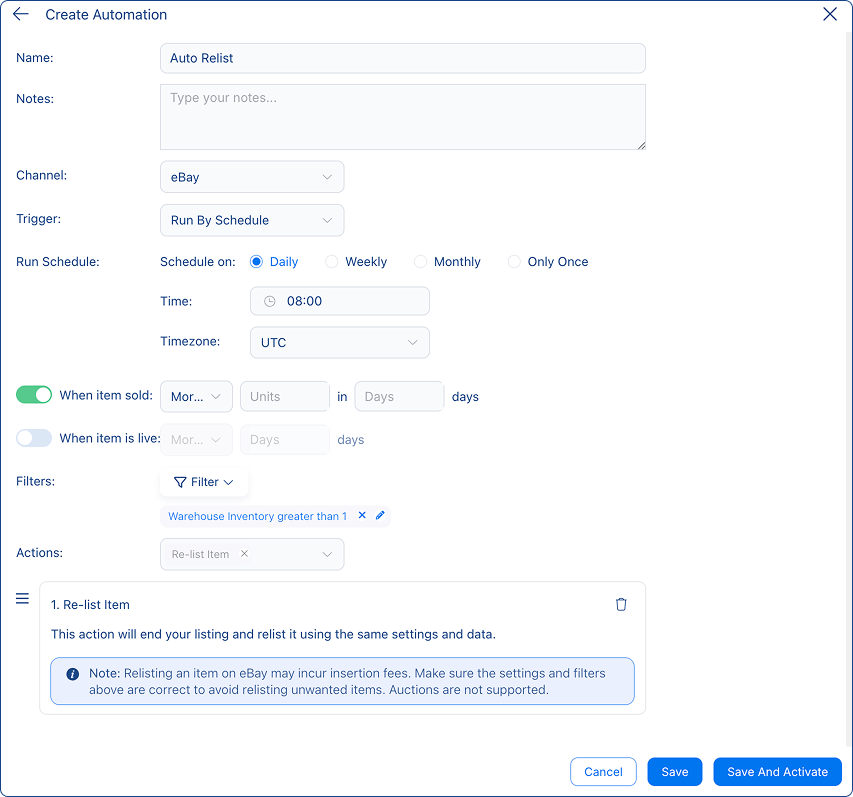
Previously, relisting required navigating to ended listings and relisting each item individually. Now, you can set the rule once and let it run in the background.
To get started, navigate to Listing Tool → Automations and create a new Relist Item rule.
For step-by-step instructions, see how to set up Re-list Automation.
2. Bulk AI Category Auto-Map
The bulk Edit Item Category action in the 🔗 Listing Tool now includes an AI auto-map option. When recategorizing multiple listings at once, you can select Generate Item Category under the AI Actions to let 3Dsellers' AI automatically assign each listing to the most optimal eBay product category.
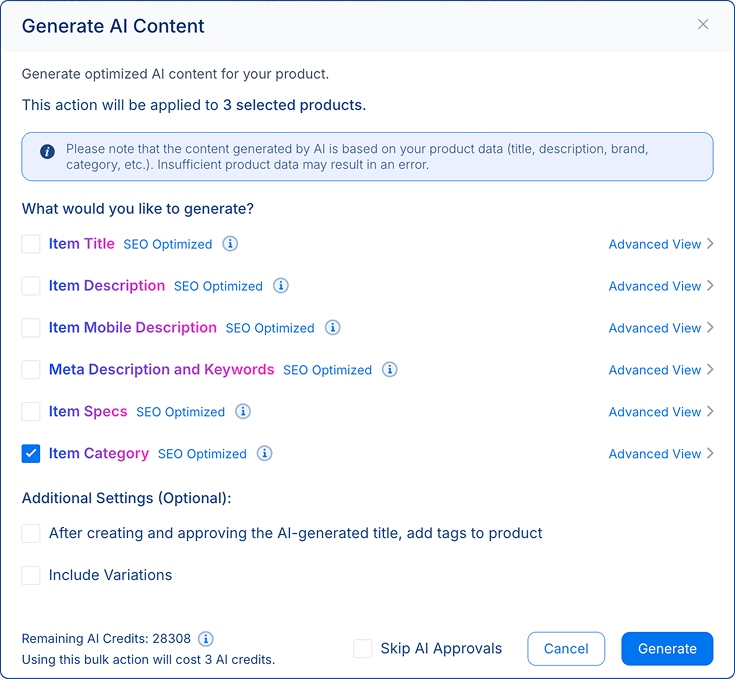
Previously, changing categories in bulk required you to manually select the correct category for each batch of listings. With the new AI bulk categorization feature, you simply select the listings you want to recategorize, open the bulk actions menu, choose Change Category, and tick the Item Category option to generate optimized product categories for listings.
3. Duplicate SKU Detection in the Catalog
The 🔗 Product Catalog now alerts you when two or more products share the same SKU. A new Action Needed indicator flags duplicate SKUs and opens a dedicated view where you can review and resolve the conflicts before they cause inventory sync problems across your connected selling channels.
From this view, you can identify which products are affected and take action by updating the SKU on one of the conflicting products directly from the catalog. Keeping SKUs unique is essential for effective inventory management and accurate multichannel inventory sync, and this detection tool helps you proactively keep your SKUs organized before they cause problems.
We also fixed a related bug where the duplicate SKU check was incorrectly flagging ended listings as conflicts — the detection now applies only to active products.
For more on how duplicate SKUs affect imports and how to fix them, see how 3Dsellers matches and merges products.
4. Edit SKU & Select Warehouse When Creating Products with AI
When creating new products in the 🔗 Product Catalog using the AI image-to-product flow, you can now edit the auto-generated SKU and select a specific warehouse before saving the product.
Previously, AI-created products were added to the catalog with an auto-assigned SKU and a default warehouse, requiring an additional editing step. For sellers who follow structured SKU naming conventions or manage inventory across multiple warehouse locations, both fields can now be customized directly in the product creation workflow.
Simply use Images to Products as normal and you'll see the new SKU and warehouse fields available before you save the new product.
5. Functionality Improvements & Bug Fixes 🐞
We've addressed a significant number of bugs and made several platform improvements this month:
Functionality Improvements:
🛠️ Pick List in Print Sections – You can now include a pick list when printing from the Orders section, making it easier to prepare outgoing orders for fulfillment.
🛠️ "Very Good – Refurbished" Condition in Bulk Actions – Added the "Very Good – Refurbished" item condition as an option in bulk listing actions.
🛠️ Cost Field (formerly Wholesale) – The "Wholesale" field has been renamed "Cost" and now correctly syncs the cost value to linked listings for more accurate profit tracking.
🛠️ Catalog Import/Export Status Split – The import and export status views in the catalog have been split into separate dedicated pages for clearer navigation and monitoring.
🛠️ Billing & Subscriptions – Improved billing accuracy for some older accounts, and smoothed out the cancellation flow.
Bug Fixes:
🔄 Helpdesk Messaging – Tidied up message ordering in thread view, addressed a click error some users were seeing, and ensured eBay client messages get marked as read when dispatched.
🔄 Helpdesk Automations – Auto responder and Amazon automated messages now send reliably according to their configured settings.
🔄 Helpdesk Insights – Median first response time now calculates correctly across the 7, 14, and 30-day windows.
🔄 Catalog & AI Tools – AI-generated tags now apply to products as expected, catalog imports complete without errors in previously affected scenarios, and AI background removal works consistently for all users.
🔄 Catalog Inventory & Sync – Inventory logs now capture eBay orders and manual updates without gaps, ended eBay listings reflect the correct status in the catalog, and Country of Origin values save reliably on live listings.
🔄 Price & Offers Automation – Price reduction rules and offers automation now run consistently across all eligible listings and accounts.
🔄 CSV Import & Export – “Up to Quantity” values import correctly from CSV, and exports now return the full expected item count.
🔄 Listings UI & Flow – The cancel/apply button now clears properly after saving, and the Image to Listing flow picks up the correct item location from your existing listings.
🔄 Channel Integrations – WooCommerce listing and Shopify order status display both work smoothly across all account types.
%20(1).png)

3Dsellers newsletter

.png)
.png)
.png)
