


An eBay listing can offer the right product at the right price and still never sell if buyers don't click on it. When a listing isn't getting views, the cause usually comes down to one of two problems: it ranks too low in search results for buyers to find it, or buyers see it and scroll past it to a competing listing. Without engagement from buyers, a listing has no chance of converting.
In this guide, we'll walk through 7 tactics to increase eBay listing views and help you get more engagement — and ultimately sales — for your listings. We'll also learn how to diagnose the problem on a listing that isn't getting views, so you know exactly what you need to fix to achieve better visibility and engagement.
Key Takeaways on How to Increase eBay Listing Views
- Listings with no views typically have either an impression problem or a click problem. Low impressions mean buyers aren't seeing the listing in search results, while impressions without views mean they're seeing it but clicking on other listings instead.
- eBay's search algorithm, Cassini, rewards listings that are both complete and accurate. Improving titles, categories, item specifics, and photos should be the first step for any listing with low visibility or views.
- Seller performance affects the visibility of every listing in your store. Sellers who rank Below Standard see less visibility for their listings across the board.
- Promoted Listings and sharing listings on social media can get more eyes on your listing, but they won't fix a low-quality listing. Optimize the listing before paying to promote it.
How eBay Listing Views Work
Before you start making changes in an attempt to increase your eBay listing views, it helps to understand what counts as a listing view, and what decides whether a listing gets seen in the first place. Below, we'll break down the three metrics used to measure listing traffic, explain how Cassini ranks listings in search, and show you how to see each listing's view count to understand how well it's performing.
Impressions vs Views vs Click-Through Rate
eBay tracks listing traffic with three related metrics: impressions, views, and click-through rate.
- An impression is counted each time a listing appears on eBay, whether in search results, in your eBay Store, or on other eBay pages.
- A view is counted when someone actually clicks on the listing to view the listing page.
- Click-through rate (CTR) is the percentage of impressions that lead to a click, and it tells you how often buyers who see a listing choose to open it. For example, a listing with 1000 impressions and 20 views has a CTR of 2%.
Looking at all three numbers together shows where a listing is falling short: buyers either aren't seeing it, or they're seeing it and moving on.
How Best Match Ranks Listings
When buyers search for an item on eBay, their results are sorted by Best Match by default. Cassini, eBay's search algorithm, ranks listings in Best Match based on how closely they match the buyer's search terms, how popular the item is, its price, and the quality and completeness of the listing. In addition to these listing-specific factors, it also weighs selling terms like return policy and handling time, as well as the seller's ranking and overall track record on eBay.
How to See Views on Your eBay Listing
You can see how many views a listing has received on the Active and Unsold listings pages in Seller Hub, My eBay, and the eBay app, as well as on the listing page itself when you're logged in. For more details, go to Seller Hub > Performance > Traffic, where you can see impressions, views, and CTR for all of your listings.
7 Tactics to Increase eBay Listing Views
As we discussed above, listings on eBay are ranked based on a variety of factors. As such, there's no single fix that will increase every listing's view count. Instead, you'll need to analyze your listings to understand where they're lacking and what needs to be fixed. Below, we'll go over seven tactics to improve common listing visibility problems, from the content of the listing itself to the way you run your account.
1. Use Strong Keywords in Titles and Descriptions
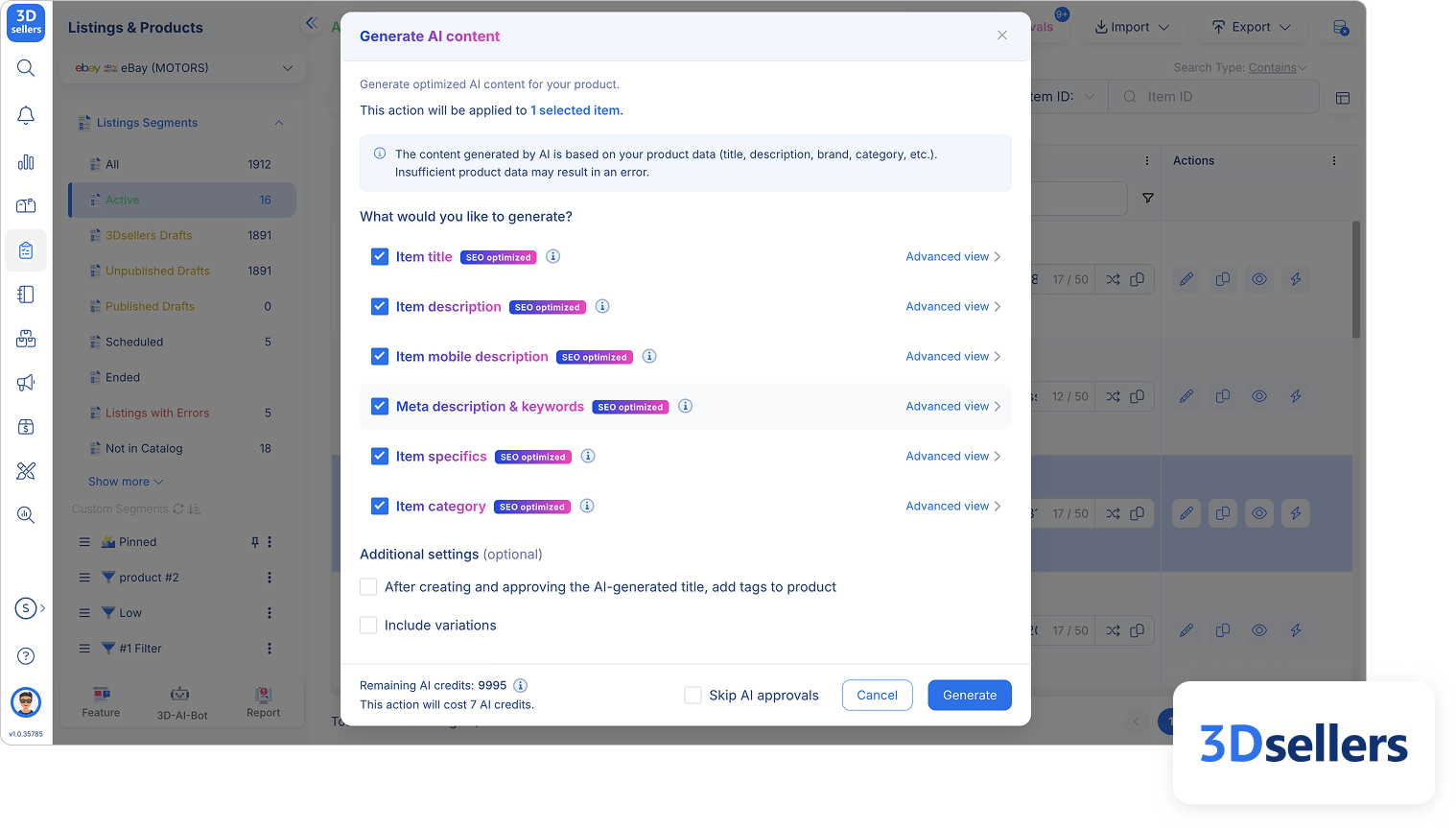
A listing's title has the most direct impact on whether it appears in a given search, since its keywords are the first thing Cassini looks at. Titles are limited to 80 characters, which is enough room for the details buyers search for: brand, model, and key attributes like size, color, or material. Knowing which of these details to include and in what order is the core of a successful eBay title optimization strategy.
Optimized eBay titles are not just about what to write, but also about what not to write. Avoid keyword stuffing or adding unrelated keywords, as they make a title harder to read without improving its SEO. In fact, Cassini actually penalizes these behaviors by lowering the listing's ranking in searches.
While less important for clicks than titles, descriptions are still an important part of an eBay listing. Descriptions should contain both the main keyword and secondary keywords, and be structured in a way that makes them easily scannable. Make use of bullet points, tables, and headings to organize the description in a way that's easy for both Cassini and buyers to read.
2. Choose the Right Category and Item Specifics
Choosing the most accurate and specific product category for your listing helps eBay understand what you're selling and match the listing to the most relevant searches. It also helps visibility in cases where buyers browse by category rather than conduct a site-wide search.
Item specifics are another form of structured data for Cassini to analyze, and they're just as important. They cover details like brand, size, color, and material, and are used both by Cassini and by buyers to filter and narrow down their search results. The more item specifics you include in your listing, the more parameters it can be filtered by, increasing its chances of appearing in more filtered searches.
3. Upload Up to 24 High-Quality Photos
Since buyers can't see or handle an item when shopping online, listing photos are one of the main driving factors that get buyers to click. The main photo is one of the first things buyers see in search results, and listing photos are one of the many factors Cassini uses to assess a listing's quality. eBay lets you add up to 24 photos to every listing, so make the most of them. Take high-resolution photos of the item from every angle, and add close-ups of important details and textures. Be sure to photograph any flaws, scratches, or signs of wear as well, since being upfront about an item's condition helps prevent "Item Not as Described" returns and potential negative feedback.
From a technical perspective, aim for about 1600 pixels for the best results. Square (1:1) or 16:9 photos tend to look best in both listings and search results. Keep the main photo simple, without borders, props, staging, or added text. If you're selling an item that isn't brand new, use a photo of the actual item rather than a stock image.
4. Offer Competitive Pricing, Shipping, and Returns
Being competitive might be an obvious tip, but many sellers hyper-focus on the technical aspects of optimization and forget what makes buyers click on a listing in the first place — a good price.
Item price and shipping cost appear right in search results, so buyers can compare them with competing listings at a glance. Cassini takes them into account too, along with selling terms like your return policy and handling time. In fact, eBay says outright that competitive prices and reasonable shipping have a direct effect on a listing's search ranking.
To price competitively, you need to know what similar items have actually sold for, not just what other sellers are asking. 3Dsellers' AI price suggestion tool, part of its selection of AI listing tools, does this research for you. It looks at real eBay sold data for similar items, as well as current market demand, on the eBay marketplace you're selling on. Based on that data, it suggests a competitive selling price for your item, so you can price new listings without having to sift through sold listings manually.
5. Maintain Strong Seller Performance
When ranking listings in buyer search results, Cassini also looks at your track record as a seller. This means your account's performance affects the visibility of every listing in your store, not just one.
eBay reviews each seller's performance every month and assigns one of three seller levels: Top Rated, Above Standard, or Below Standard.
If your account falls Below Standard, your items may be placed lower in search results. To avoid this and keep your account in good standing, ship orders on time and with tracking, describe items accurately, and keep your inventory up to date so you don't have to cancel orders for items that are out of stock. Always respond to buyer messages and return requests promptly and professionally, and address problems before they spiral into cases closed without seller resolution or negative feedback.
6. Run Promoted Listings Campaigns
Promoted Listings are eBay's ads for individual listings. It places them in prominent spots at the top of search results and on related product pages. eBay offers two campaign strategies:
- General campaigns, which charge a commission on the sale amount. You only pay when the item sells within 30 days of a click on the ad.
- Priority campaigns, which charge per click. You determine your daily ad spend through a budget you set in advance.
Promoted Listings are available to Above Standard and Top Rated sellers with enough account activity, for fixed-price listings in most categories.
.png)
7. Share Listings on Social Media
While often overlooked, sharing your listings on social media puts them in front of people who might never have searched for them on eBay in the first place. Every eBay listing has a Share button you can use to post it to social media or copy its link. If you have an eBay Store, you can also connect your Facebook, Instagram, and Pinterest accounts without leaving eBay. If you'd prefer to actually sell through social media and other channels, 3Dsellers' multichannel integrations make it easy to get started.
Sharing won't help your listings rank higher on eBay, but it's a simple, free way to get more eyes on them. When people click through from your posts, those visits show up as off-eBay views in your traffic report, so you can see how much traffic these social media posts are actually bringing in.
Why Your eBay Listing Is Not Getting Views
In our experience, low views almost always trace back to one of two problems: the listing isn't being shown to buyers, or it's being shown but buyers aren't clicking. Below, we'll look at the most common causes of each.
Low Impressions
Low impression metrics mean that eBay isn't showing the listing to many buyers. The most likely causes are:
- Weak or missing title keywords. If the title doesn't include the terms buyers search for, the listing won't show up in their searches.
- The wrong product category. A listing in a category that doesn't fit the item is less likely to match relevant searches.
- Missing item specifics. When buyers use filters like brand or size to narrow their search, listings that are missing that information won't show up.
- An uncompetitive price or selling terms. Price, return policy, and handling time all affect ranking.
- Below Standard seller status. Items from Below Standard sellers may be placed lower in search results.
Impressions Without Clicks
If a listing has plenty of impressions but few views, it means that buyers are seeing it in search results but choosing to scroll to other listings instead. This shows up as a low CTR in the traffic report. Buyers decide whether to click mostly based on their first impression of the main photo, title, price, and shipping cost, so those are the first things you should check if buyers aren't clicking.
How 3Dsellers Helps Increase eBay Listing Views
Diagnosing listings one at a time works for a small store, but it becomes impractical once you're managing hundreds or thousands of listings. Finding the listings with missing item specifics, weak titles, or uncompetitive prices means checking each one by hand, which could take hours or even days depending on how many listings you have.
3Dsellers' eBay listing software handles this for you with an AI Listing Quality Score. Every listing is checked automatically and given a score based on how complete and well-optimized it is. The score covers everything from the title, description, and item specifics to the price, photos, and product identifiers. For each problem it finds, it suggests a fix, and many of those fixes can be made with AI in a single click.
.png)
FAQs About Increasing eBay Listing Views
Q: Do Promoted Listings increase views on eBay?
Yes, Promoted Listings can increase visibility and views on eBay. Promoted Listings place listings in prominent sponsored ad spots on eBay, including search results and product pages, so more buyers see them. This doesn't necessarily guarantee more clicks, and it's important to make sure a listing is well-optimized before spending money on promoting it.
Q: What counts as a view on an eBay listing?
A view is counted each time someone opens a listing on the eBay website or app. If someone leaves the listing and comes back, or refreshes the page, each visit counts as another view. Your own views while logged in, bot traffic, and appearances in search results without a click (impressions) don't count as views.
Q: Does ending and relisting an item increase views on eBay?
No, not by itself. eBay doesn't rank a listing higher just because it's newer, and listing age isn't a factor Cassini considers when ranking listings.
Q: Does seller performance help increase visibility on eBay?
Yes, a seller's ranking is one of the variables that Cassini uses to rank listings, so it affects the visibility of every listing in your store. Sellers who fall Below Standard typically have their items placed lower in search results, resulting in low visibility and engagement.
%20(1).png)

3Dsellers newsletter

%20(1).png)
.png)
%20(1).png)
