

%20(1).png)

As an eBay seller, you know how much time and effort goes into building a high-quality listing. Between researching keywords, photographing the product, filling out item specifics, writing a description, and applying formatting, a single listing can take anywhere from a few minutes to well over an hour to create. Given the effort involved, it's no surprise that sellers look to reuse existing listings whenever they can, whether that means using a listing as the base for a new one, expanding a listing to another eBay region, or moving inventory to a second store.
Copying eBay listings is common practice, but there are important rules and considerations you'll need to know before you start. eBay has clear guidelines around how copied listings can be used, and copying listings between accounts or eBay sites almost always requires adjustments before those listings can go live. In this guide, we'll cover everything you need to know about copying eBay listings the right way, from using eBay's built-in Sell Similar tool to copying listings across multiple accounts and international eBay sites.
Key Takeaways
- eBay's Sell Similar offers sellers a way to copy a listing into a new one with all fields pre-filled.
- Copying a listing between eBay regions requires adjustments to category, currency, and item specifics.
- Fixed-price identical listings from the same seller are prohibited by eBay's duplicate listings policy, even on different selling accounts.
- 3Dsellers' tools let sellers copy listings between accounts, localize them for international selling, and reuse listing details to build new listings faster.
Why Sellers Copy eBay Listings
There are plenty of reasons why sellers copy eBay listings, most of which involve saving time and getting more mileage out of existing listings. Some sellers copy their fixed-price listings as a way to refresh listings that have lost visibility over time, others copy listings to reuse their structure for similar products, while others do it to help them more easily list items across multiple eBay regions or run more than one eBay store.
Legitimate as all of these use cases are, eBay's duplicate listings policy sets limits on how identical listings can coexist on the platform. For fixed-price listings, only one active listing for an identical item is allowed at a time from the same seller. The policy applies across different eBay usernames belonging to the same seller as well, meaning publishing the same listing on two of your own accounts is a violation. Penalties for violating the policy range from listing removal and a warning to activity restrictions or, for serious cases, full account suspension.
There is one important exception to know: separate listings for the same item are allowed across global eBay sites (for example, eBay.com and eBay.co.uk), as long as their shipping options ensure that they only show up in one site's search results.
Pro Tip: For sellers who manage multiple eBay accounts, 3Dsellers enables you to keep your accounts private from eBay, preventing eBay from linking between your selling accounts.
How to Copy an eBay Listing with Sell Similar
Sell Similar is eBay's built-in method for copying an existing listing. It allows sellers to create a new listing that comes pre-filled with all the details from the original, from the title and description right down to the images and item specifics. Below, we'll go over how to copy a single listing from Seller Hub, and how to save a listing as a template for reuse later on.
Copy a Single eBay Listing from Seller Hub
To copy a listing with Sell Similar, select the listing in Seller Hub and choose Sell Similar from the Actions dropdown, and eBay will then open a fresh listing with all fields from the original pre-populated. From there you can simply edit as normally, and adjust anything that needs to differ from the source.
Save an eBay Listing as a Template for Reuse
eBay listing templates are HTML-based design and structure that determine how a listing looks – the layout, sections, colors, and formatting. Saving a listing as a template captures the design of that listing, so you can apply the same look to future listings without having to rebuild everything from scratch each time.
You can save an existing listing as a template from Seller Hub through the Manage Templates section, or when saving changes to an existing listing. Once saved, your templates are available in the listing flow, and you can select any of them as the starting design when creating a new listing.
Pro Tip: 3Dsellers offers a free eBay listing template designer, where you can create your own custom listing designs with a simple WYSIWYG editor. When you're happy with your design, simply download the HTML code and save it for future use!
How to Copy eBay Listings to Another Account
Since eBay doesn't offer a native way to transfer listings between seller accounts, copying listings from one account to another requires either recreating them manually or using a third-party listing tool that supports cross-account copying, such as 3Dsellers. Below, we'll cover the two things you'll need to account for when copying listings between accounts: matching business policies and adjusting for any differences between the source and destination eBay sites.
Match Business Policies Across Both eBay Accounts
eBay business policies give sellers a way to define reusable policy templates for shipping, payment, and returns, which can then be applied to every item they list on eBay. These policies are created at the account level, so each policy is tied to the account that created it. As such, they're not carried over when you copy an eBay listing.
For sellers who manage multiple eBay accounts and need to copy listings between them, 3Dsellers includes a built-in business policies manager that lets you save policies once and apply them across all connected accounts in bulk, so you don't need to recreate them for every store.
Adjust Listings When Copying Between International eBay Sites
Every international eBay site – eBay.com, eBay.co.uk, eBay.de, eBay.com.au, etc. – has its own category structure, required item specifics per category, currency, and regulatory requirements. Because of these differences, a listing that's copied from one eBay site to another as-is might be missing required fields, have less-than-optimal categorization, or fail to comply with local laws and regulations.
Before publishing a copied listing on a different eBay site, it's important to review the destination site's category requirements and required item specifics, convert prices to the local currency, and confirm that the listing complies with any local regulations. For sellers who want to skip the tedious research and manual work required to do this for each listing and market, 3Dsellers' AI-powered listing localization handles most of the work for you. With 3Dsellers' listing localization tools, you'll be able to translate listing content with AI, convert currency, and adapt item specifics easily and in bulk, saving you time and improving listing accuracy on all your selling accounts. And for copying listings to EU eBay sites, 3Dsellers has built-in GPSR compliance tools that will help you ensure you're compliant with EU laws and regulations.
For step-by-step instructions, see how to use Sell Globally to list items on other eBay sites.
.png)
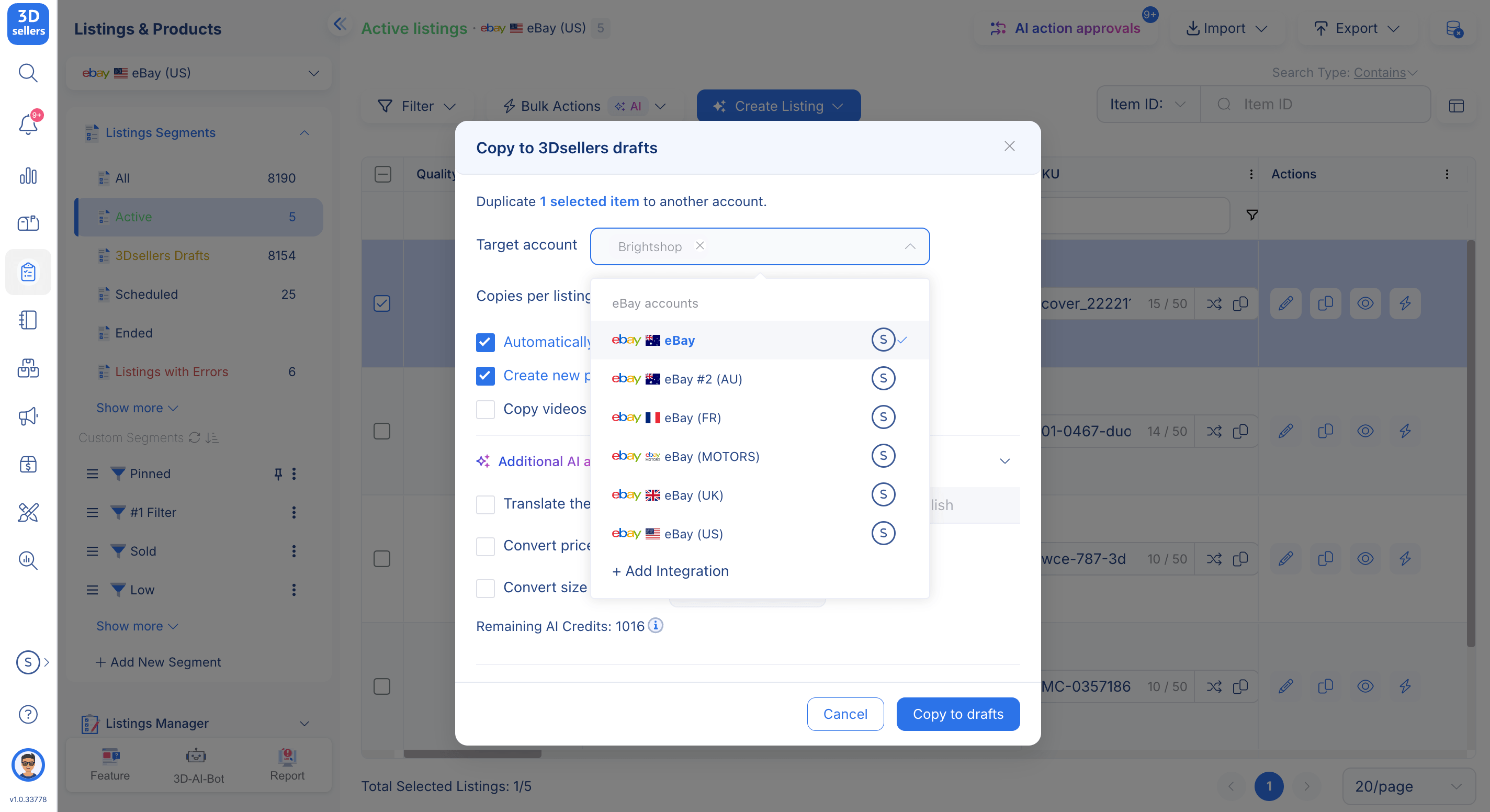
Copy eBay Listings Across Accounts With 3Dsellers
For sellers who want to copy eBay listings between accounts efficiently, 3Dsellers offers a dedicated tool that handles the entire process from within its listing management interface. But 3Dsellers lets you do more than just copy listings between accounts. You'll also be able to automatically apply business policies to the newly copied listings in bulk, localize listing content for international eBay sites, and convert currency at current exchange rates. And for even more optimization and fine-tuning, use bulk AI actions to edit every listing element, from images to pricing, with just a simple prompt.
For international selling, 3Dsellers has a range of AI-powered listing localization tools that can optimize copied listings for their target markets, ensuring that every listing has the best possible start, no matter which eBay site it's published on.
Pro Tip: 3Dsellers allows you to manage each connected eBay account entirely separately, giving you the freedom to manage multiple stores from one dashboard without worrying about your accounts being linked to one another in eBay's system.
The help center walks through copying and transferring listings to another eBay account.
Frequently Asked Questions
Q: Can I List the Same Item on Two eBay Accounts?
No, listing the same item is not allowed on different accounts that belong to the same seller, since eBay's duplicate listings policy applies across accounts. The exception is different international eBay sites, where the same item can be listed separately on each provided that shipping settings prevent listings from appearing in the same search results.
Q: How Do I Transfer Listings from One eBay Account to Another?
eBay has no native way to transfer listings between seller accounts. If you want to copy listings between accounts, you'll need to use a third-party tool like 3Dsellers, which allows sellers to copy listings between their connected accounts.
Q: Does eBay Allow Duplicate Listings Across Multiple Accounts?
No. eBay's duplicate listings policy prohibits identical fixed-price listings across accounts owned by the same seller. The same item can be listed separately on different eBay country sites, and identical auction-style listings are permitted only under specific conditions outlined in the platform's duplicate listing policy.
%20(1).png)

3Dsellers newsletter

.png)
%20(1).png)
