
AI has become an integral part of many ecommerce sellers' workflows in recent years, offering a useful way to do everything from managing product listings to handling customer support. With the advent of MCP connectors, it's now even easier for sellers to integrate AI into their daily workflows to save time and avoid errors. Instead of copying listing details into a chat one at a time, eBay sellers use an eBay MCP server to give the AI direct access to their eBay store. Depending on the specific tool and the permissions you give it, it can do things like look up orders, fix listings, update prices, and more.
But with several eBay MCP servers to choose from, each built for different selling needs, it can be hard to know which one is right for you. In this guide, we'll explain what an eBay MCP server is, compare six of the best options for 2026, and walk you through how to connect helpful AI tools like Claude, ChatGPT, and Grok to eBay through 3Dsellers.
Key Takeaways
- An eBay MCP server connects an AI assistant like Claude or ChatGPT to an eBay store, so it can answer questions and make changes.
- Hosted MCP servers connect with a link and a sign-in, while local servers require technical setup and an eBay developer account.
- eBay's official MCP server is a developer-oriented tool that can read eBay data, but can't change it.
- Choosing the best eBay MCP server will depend on the tasks you need it to handle and the channels you plan to sell on.
- The 3Dsellers MCP server works with Claude, ChatGPT, and Grok, and works for eBay as well as other integrated marketplaces from a single connection.
What Is an eBay MCP Server?
MCP (Model Context Protocol) is an open standard for connecting AI assistants like Claude and ChatGPT to third-party tools and data, such as an eBay Store. Using this connection, an eBay MCP server can give the connected AI the ability to see and do things within your store in order to make store management tasks easier, less time-consuming, and less prone to errors. With an MCP connection, your third-party AI tool of choice can do things like look up orders and listings, and (with permission) some eBay MCP servers can also take actions like changing prices or ending listings.
In this section, we'll look at the difference between the two main types of MCP servers, and learn more about what you can actually do with an eBay MCP.
Hosted vs Local eBay MCP Servers
eBay MCP servers fall into two groups: local and hosted. The main difference between them is where the server runs.
A local server runs on your own computer, which means that you'll need to install and set it up yourself. This process takes some technical know-how, and requires registering for an eBay developer account.
For a plug-and-play option, most sellers opt for a hosted server that runs on a third-party tool and connects popular AI assistants like Claude, Grok, and ChatGPT. To connect one of those apps, you simply need to add the third-party tool's MCP server as a connector, thereby giving it access to your eBay account.
What Sellers Can Do With an eBay MCP
Which tasks an AI assistant can handle through an eBay MCP connector depend on the tools that the specific server offers. Some servers are read-only, while others can make changes on your eBay account. If you have a server that does both, you can ask the AI to do things like:
- Show every order from the last three days that hasn't shipped yet
- Find listings with errors or missing item specifics
- Raise the price of every listing in a category by 10%
- Create a listing for a new product and publish it to eBay
- Tag all orders over $100 for priority shipping
Handing tasks like this to an AI assistant helps you work faster and more accurately, and provide a better shopping experience for your customers.
Why eBay Sellers Use MCP Servers
Selling on eBay involves a lot of routine administrative tasks, from updating order tracking to regularly optimizing listings. With an MCP server, many of these tasks can be completed faster and more accurately. For example, if you want to know which listings need your attention, you can ask the AI to give you a list of all live listings that have incomplete item specifics. Or, if you need to know which orders need to be processed today, you can request a list of orders that need to ship out in the next 24 hours, and even ask the AI to tell you which orders might need an expedited shipping service in order to meet their delivery deadline.
Connecting a third-party AI agent with an MCP server is also a great way to simplify bulk actions, such as store-wide price changes or stock updates. Rather than uploading a CSV file or manually creating listing rules and filters, you can describe your desired bulk action in plain English (e.g. "lower prices by 5% on every listing in a winter clothing collection") to the AI agent, and the AI will execute it for you. For an added layer of security, 3Dsellers' MCP for eBay lets you request a preview of the changes before anything goes live.
Best MCP Servers for eBay Sellers
eBay MCP servers range from free developer projects to hosted platforms built specifically for sellers. If you're new to using AI in your workflows, it's easy to become overwhelmed with the options available on the market. To help you decide which eBay MCP best suits your needs, we'll take a look at six of the best options for eBay sellers in 2026, and examine each one by ideal use case.
1. 3Dsellers MCP: Best for eBay Sellers Who Want to Grow
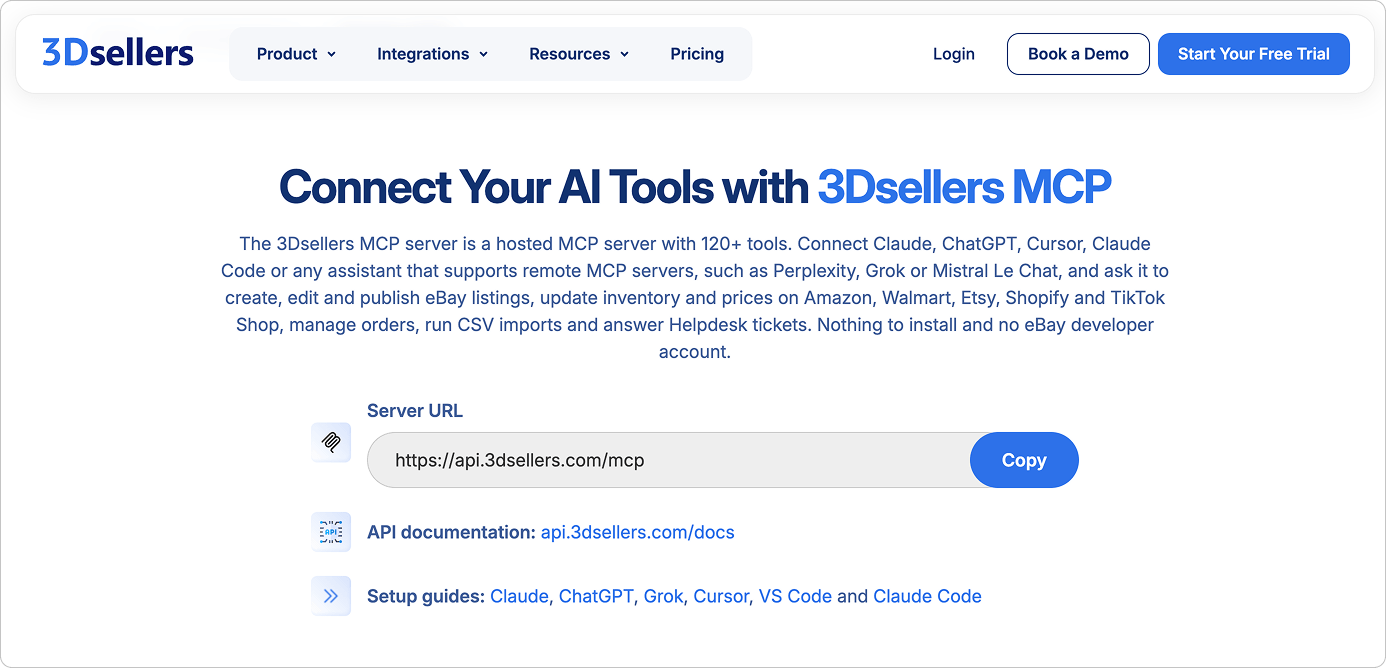
For eBay sellers who sell on more sales channels or are planning to expand beyond eBay in the future, 3Dsellers' MCP server connects an AI assistant to 3Dsellers' entire platform rather than to eBay alone. It's a hosted server, so there's nothing to install and no eBay developer account to register. You add it to Claude, ChatGPT, or Grok with a link and a 3Dsellers sign-in. From there, your AI agent can use more than 120 tools to manage listings, inventory, orders, customer support, and automations.
On the Professional plan, which supports multichannel selling for non-eBay channels and a central product catalog, you'll be able to use the connector to manage listings and orders on channels like Amazon, Walmart, Etsy, Shopify, TikTok Shop, WooCommerce, BigCommerce, as well as Mirakl-based marketplaces.
Before making any changes to your account, the AI agent asks for your approval, so nothing is done without your knowledge. Everything is also recorded in a request log, which lets you see which tool the AI used and when.
The MCP connection is available on every 3Dsellers plan, including the free trial. Read-only access is free, while AI actions use AI credits.

2. Frooition for eBay: Best for eBay-Only Stores
Frooition for eBay is a hosted MCP server built only for eBay stores. Setup starts with a Frooition account, which you connect to your eBay account, then install the server in your AI tool of choice. Frooition's eBay MCP connector works with Claude, ChatGPT, and Grok, as well as the business tiers of Gemini and Microsoft Copilot.
Once connected, the AI can answer questions about listings, orders, and buyer messages, and can help you spot listings that get views but don't convert. It can also generate SEO reports, create listings from a product photo, mark orders as shipped, reply to buyers, and check how your eBay Promoted Listings are performing.
Read-only requests, creating SEO reports, and editing listings individually are all free, but bulk edits and applying Frooition's listing designs use paid AI credits or require a paid subscription (Boost Basic or higher). Unfortunately, since Frooition does not publish pricing, it can be difficult to gauge which one would be most cost-effective for your specific needs. Since the connector is built exclusively for eBay, it's best suited to sellers who don't sell on (or plan to expand to) other marketplaces.
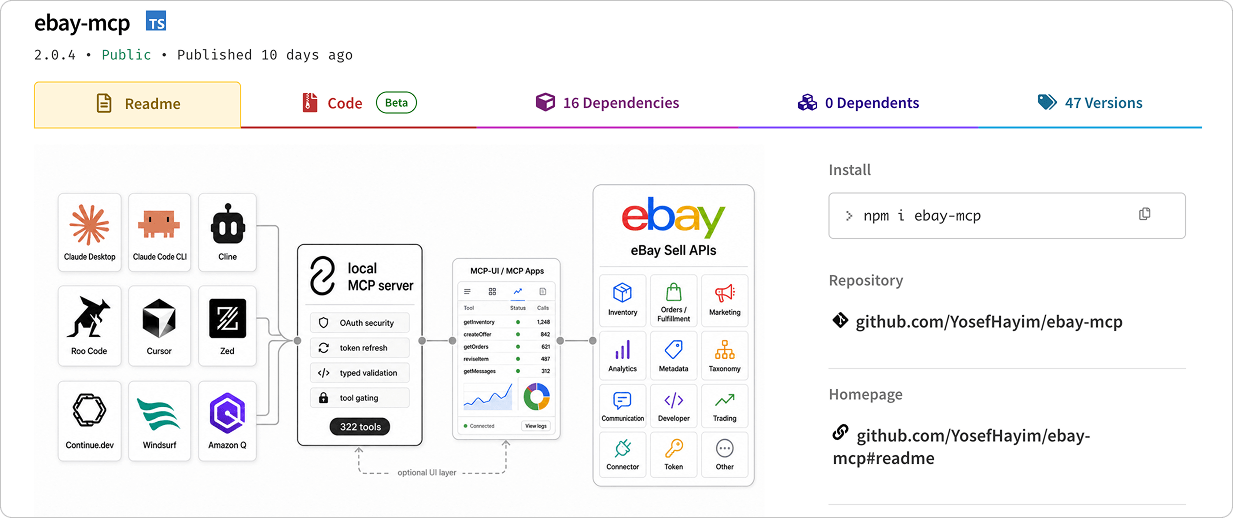
3. eBay MCP by YosefHayim: Best for Developers
If you're a developer (or you have a developer on your team), eBay MCP by YosefHayim offers everything you need in an eBay MCP server: full read and write access through eBay's Sell APIs. It's the first locally-hosted server on our list, and is completely free and open-source. It includes more than 300 tools that can do everything from updating inventory and orders, adjusting Promoted Listings campaigns, and generating analytics reports.
Setting it up requires Node.js installed on your computer, as well as an eBay developer account with app keys. It works with desktop and coding tools such as Claude Desktop, Claude Code, Cursor, and Windsurf. Because it runs locally, eBay keys and sign-in details are stored only on your own computer, adding another layer of privacy and safety. That said, since you're the one managing the server, installing updates and resolving problems is up to you.

4. eBay API MCP Server: Best for Read-Only Data Lookups
For another free option, eBay's own MCP can get the job done, though it's built for a narrower job than the other MCP servers on this list. It's read-only, which means it can look up data but can't make any changes to your listings or update your orders.
Unlike the other MCP servers on our list, eBay's server doesn't come with ready-made tools for specific tasks. Instead, you ask a question in plain English and the AI works out how to get that information from eBay.
Setup requires Node.js (version 22 and above) and an eBay developer account with app keys. Those keys are enough to look up public eBay data, like item details. To see your own orders and inventory, you'll also need to sign in with your eBay seller account.

5. CData MCP Server for eBay: Best for Reporting and Data Analysis
If you're looking for an MCP server that can give you deep insights and analytics about your eBay sales, CData is the best option on our list. It presents live eBay data in a format similar to a database, which makes it easier for the AI to sort, total, and compare information quickly and accurately. CData is also the only option on our list that offers both hosted (via Connect AI) and local server options.
CData offers three ways to connect an AI assistant to eBay:
- Open-source MCP Server for eBay: This version runs on your own computer and can only read data. It requires an eBay developer account, some technical setup, and a separate paid license from CData.
- CData MCP Server for eBay desktop app: The desktop app also runs on your computer, but it can edit data as well as read it. You'll still need an eBay developer account, and pricing is quote-based, so you'll need to contact CData's sales team to get a personalized quote.
- CData Connect AI: This is CData's hosted option, so there's nothing you'll need to install. You connect eBay to a Connect AI account and then add it to an assistant like Claude or ChatGPT with an MCP link.
Pricing for the MCP Server for eBay is quote-based and depends on usage, so you'll need to contact CData's sales team. Connect AI has a free trial, with paid plans available after the trial period ends.

6. Zapier MCP: Best for Cross-App Automations
Zapier MCP is a hosted MCP server from Zapier, an automation platform that connects to thousands of apps, including eBay. Zapier's MCP lets AI use eBay actions together with actions from other connected apps in the same conversation. For example, if you use Google Sheets in your workflow, it can find an eBay order and add its details to a Google Sheets spreadsheet.
Zapier's eBay integration includes three actions:
- Find orders and fetch order details
- Mark orders as shipped and add tracking information
- Make a raw API request (for advanced users, still in beta)
It has one main drawback, however: it cannot create or edit listings. For sellers who have a large number of listings to manage, this is a major downside.
Zapier MCP is available on all Zapier accounts, including free ones. Each successful AI action uses two tasks from the plan's monthly limit, so the free plan's 100 monthly tasks cover up to 50 actions.
How to Choose an eBay MCP Server
With options ranging from free developer tools to complete selling platforms, it can be tempting to start your search for the perfect MCP server by comparing feature lists. In our experience working with eBay sellers, however, a better starting point is analyzing your own workflows first to understand what you actually need for how you run your business.
Before committing to a server, take note of which tasks take up most of your time every week, and try to pinpoint where you have the most mistakes. For most sellers, these are usually repetitive tasks like updating orders, bulk tasks like editing and optimizing listings, and customer service. The tasks that take up most of your time are the ones you should prioritize handing off to AI, whether through an eBay MCP server or an AI-integrated selling platform like 3Dsellers.
If you've reviewed your workflow and determined that you don't need to cut down on listing management and customer support time, and instead mainly need analytics and reports, a read-only server will likely be enough. If you need your AI agent to execute tasks and carry out bulk actions, or if you plan to expand to other marketplaces, you'll need a server that offers these features.
With the knowledge of what you need in hand, you can then compare your options on the practical details: which AI assistant you use, whether you're comfortable managing eBay developer keys or prefer a hosted solution, and how much each option costs.
How to Connect Claude and ChatGPT to eBay with 3Dsellers
The 3Dsellers MCP server is a hosted MCP server for eBay (and other selling channels) that works with Claude, ChatGPT, and Grok. For more advanced users, the server also works in Cursor, VS Code, Claude Code, Windsurf, Codex CLI, and Gemini CLI. To get started, simply connect your preferred tool with a 3Dsellers sign-in, no coding or eBay developer account required. Below, we'll walk through the setup for each assistant.
Connect Claude to eBay
3Dsellers has an official connector in Claude's connector directory, which makes this the quickest setup of the three. It works in claude.ai and the Claude desktop app.
- In Claude, go to Settings > Connectors > Browse connectors and search for 3Dsellers.
- Click Connect, then sign in to your 3Dsellers account and approve access.
- Start a new chat, click + > Connectors, and turn on 3Dsellers.
- Ask Claude, "What 3Dsellers tools do you have access to?" to confirm the connection.
Alternatively, you can paste this link https://api.3dsellers.com/mcp directly into your Claude account by navigating to Settings > Connectors > Add custom connector.
Connect ChatGPT to eBay
3Dsellers isn't in ChatGPT's app directory yet, so you'll need to add it as a custom app.
- In ChatGPT, open Settings > Apps and create a new app, turning on developer mode if prompted.
- Name the app 3Dsellers and paste the server URL: https://api.3dsellers.com/mcp.
- Choose OAuth as the sign-in method and save.
- When ChatGPT redirects you, sign in to 3Dsellers and click Accept.
- In any chat, click + and select 3Dsellers.
Note that custom apps require ChatGPT's developer mode, which isn't available on every plan.
Connect Grok to eBay
Grok lets you add custom connectors from its Connectors page:
- Go to grok.com/connectors.
- Click New Connector, then choose Custom.
- Paste https://api.3dsellers.com/mcp and save.
- Sign in with your 3Dsellers account and approve access.
- Start a chat and turn on the 3Dsellers connector.
If you use Grok Business or Enterprise, a team admin needs to set up the connector first.
eBay MCP FAQs
Does eBay have an official MCP server?
Yes, eBay does offer an official MCP server, though it's limited in comparison to third-party solutions. eBay's official MCP server is locally hosted, so you have to install and run it on your computer, and requires an eBay developer account. It can only read data, and does not have the ability to make any changes to your eBay account. For this reason, many sellers who don't want to deal with the technical setup often opt for a hosted third-party MCP server instead.
Do I need an eBay developer account to use an eBay MCP server?
It depends on the type of server. Local servers, including eBay's official MCP server, connect directly to eBay's APIs and need developer keys to do so. MCP servers from third-party platforms that already connect to eBay, such as 3Dsellers, Frooition, and Zapier, don't require one.
Can an eBay MCP server edit listings and orders?
Some eBay MCP servers can edit listings and orders, while others don't have this functionality. 3Dsellers, eBay MCP by YosefHayim, and Frooition can all create and edit listings and have varying levels of order management functionality. eBay's official server is read-only on live accounts, and Zapier's eBay actions are limited to finding orders and adding shipping details.
Is there a free eBay MCP server?
Yes, there are several free eBay MCP server options. eBay's official server and the more advanced eBay MCP by YosefHayim are both free and open source, though they require developer setup. Frooition's free account covers reading data and single-listing changes, and Zapier MCP works on Zapier's free plan, which allows for 100 monthly tasks. 3Dsellers offers a free 7-day trial, with full MCP access from day one.
Which AI assistants work with eBay MCP servers?
Hosted servers work with browser-based assistants like Claude, ChatGPT, and Grok, as well as desktop and coding tools. Local servers work with desktop apps and coding tools such as Claude Desktop, Cursor, and Claude Code, but not with browser-based chat apps.
Can one MCP server manage eBay and other marketplaces?
Yes, there are eBay MCP servers that also support additional sales channels. 3Dsellers' server covers eBay, Amazon, Walmart, Etsy, Shopify, TikTok Shop, and more from one connection, while Frooition, eBay's official server, YosefHayim's server, and CData's server work with eBay only.


3Dsellers newsletter