Instant SKU Generator
Create SKU numbers for your products and variations in seconds. Free, no sign-up needed.


SKU Generator
Enter your item details, add variations like size or color, and get a SKU for every combination. Copy the SKUs or export them to a CSV file.


Check out our other Free Selling Tools:
Use these tools anytime, free of charge!


Get unlimited access to 3Dsellers free of charge for 7 days!



How to Use the SKU Generator
Type the item name, and click + Add Detail for things like brand or model. Click Add Variation and pick a list such as Size or Color, or choose Custom and type your own values separated by commas. Choose a separator and how many characters each part keeps. The SKUs update as you type, so just copy them or click Export CSV. Have an idea for the tool? Tell us.
Send Us an IdeaFAQs

SKU stands for stock keeping unit. It is a code you give each product you sell, so you and your software can track its stock, orders and sales.
Most people say it as one word, "skew". Spelling out the letters, S-K-U, is also common.
Tracking stock, restocking, purchase orders, picking and packing orders, and sales reports. If you sell on more than one channel, the SKU is also how inventory software matches the same product across your stores.
A short code of letters and numbers, split into parts by a separator such as a dash. Each part stands for one detail, like brand, product type, color or size. For example, WLSN-BGLV-BLU-L for a large blue Wilson baseball glove.
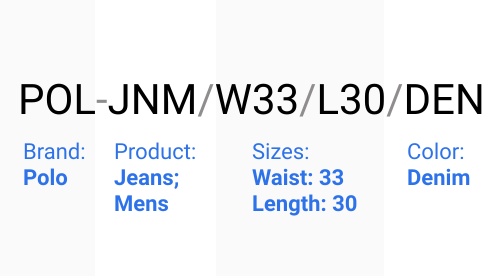
A SKU split into parts, with what each part means.
See "How do I create a SKU number?" below for a step-by-step example.
Pick the details that tell your products apart, such as brand, product type, color and size. Shorten each one to 2 to 4 characters, put them in the same order every time, and join them with a dash. A blue Wilson baseball glove in size large becomes WLSN (brand), BGLV (baseball glove), BLU (blue) and L (large): WLSN-BGLV-BLU-L. Keep SKUs short: eBay allows up to 50 characters and Amazon up to 40. Use only letters, numbers and dashes, and do not start a SKU with 0, because spreadsheets remove leading zeros.
A SKU is your own internal code, and you choose its format. A UPC (12 digits, used mostly in the US and Canada) or an EAN (13 digits, used in most other countries) is a barcode number licensed from GS1 that identifies the same product at every store. One product has one UPC, but two sellers will usually give it two different SKUs.
UPC example: 012345678905 (12 digits). EAN example: 4006381333931 (13 digits).
Online sellers, marketplaces, retail stores, warehouses and wholesalers all use SKUs to identify and track products.
Keep the same SKU when you restock the same product. Do not give an old SKU to a different product, even after the first one is discontinued, because old orders, reports and listings still point to it.
Get unlimited access to 3Dsellers free of charge for 7 days!
No credit card required, cancel any time.
